
This astounding article
Cards are a great way to organize content in a collection—products, case studies, services, and more.
Lowe’s In-House Chat UI Design System
Designing an in-house chat system that brings consistency, scalability, and human-centered UX to conversational support at Lowe’s.
Company
Lowe’s
Role
Senior UX Designer
Duration
6 months
About Lowe’s Chat Project
Lowe’s Chat experience was previously powered by a third-party vendor, LivePerson, to support both live agent chat and chatbot interactions. While functionally reliable, the platform imposed significant limitations on the front-end experience, resulting in inconsistent UI patterns, limited customization, and fragmented experiences across platforms.
This project focused on designing an in-house Chat UI framework and design system that would enable Lowe’s to deliver a consistent, scalable, and brand-aligned conversational experience across desktop web, mobile web, and native mobile apps—while supporting live agents, chatbot interactions, and future product-driven use cases.
Problem
The existing chat experience suffered from several core issues:
Inconsistent experiences across platforms
Vendor-driven UI constraints
Lack of system ownership
To address these issues, the Chat team proposed building an internally managed chat platform supported by a dedicated Chat UI design system that could scale across channels and interaction types.
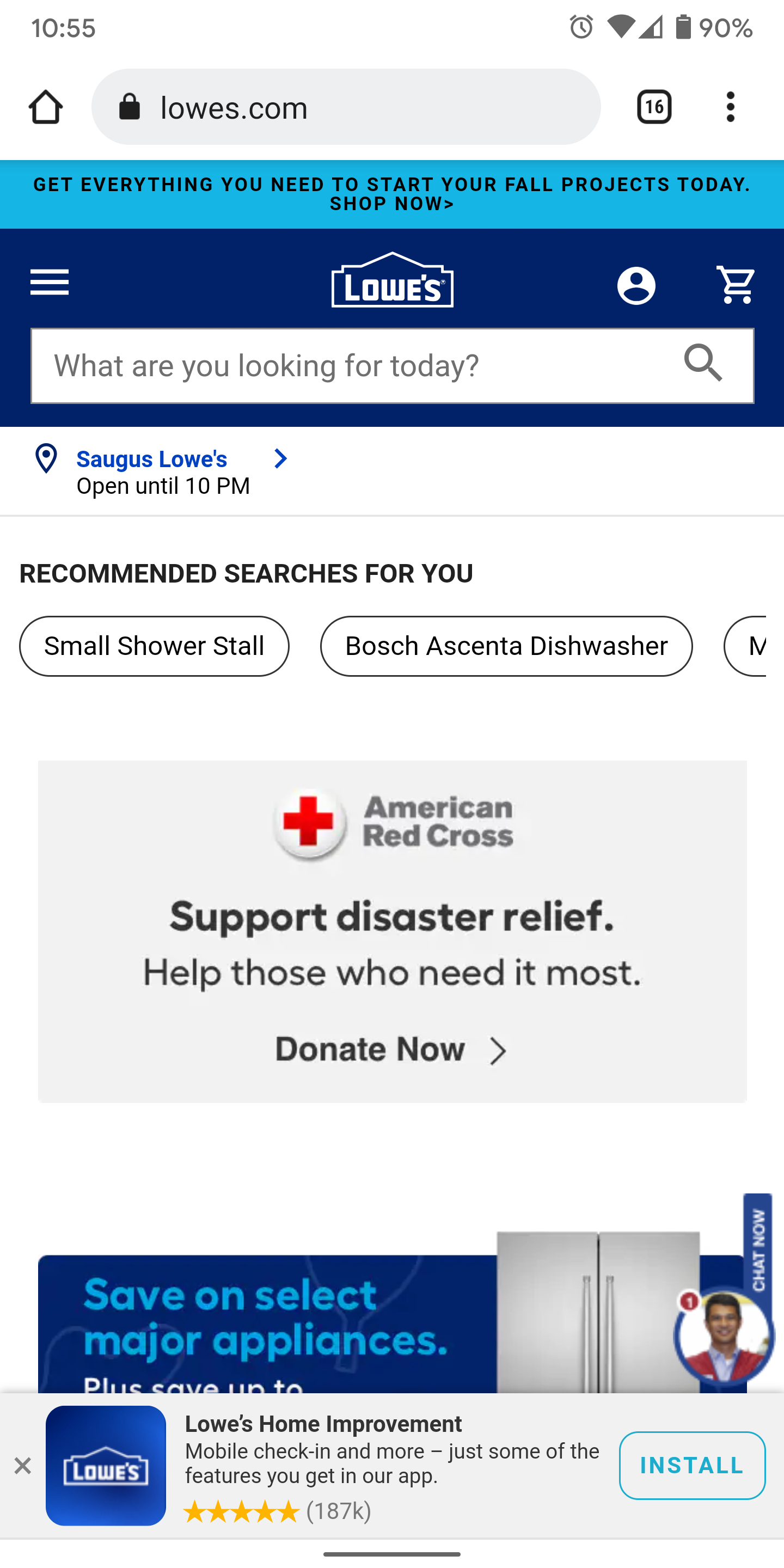
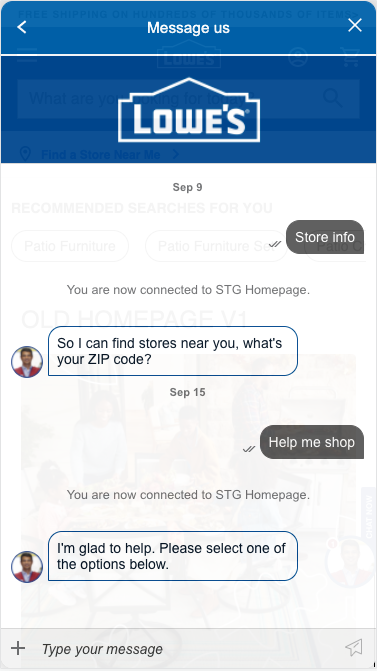
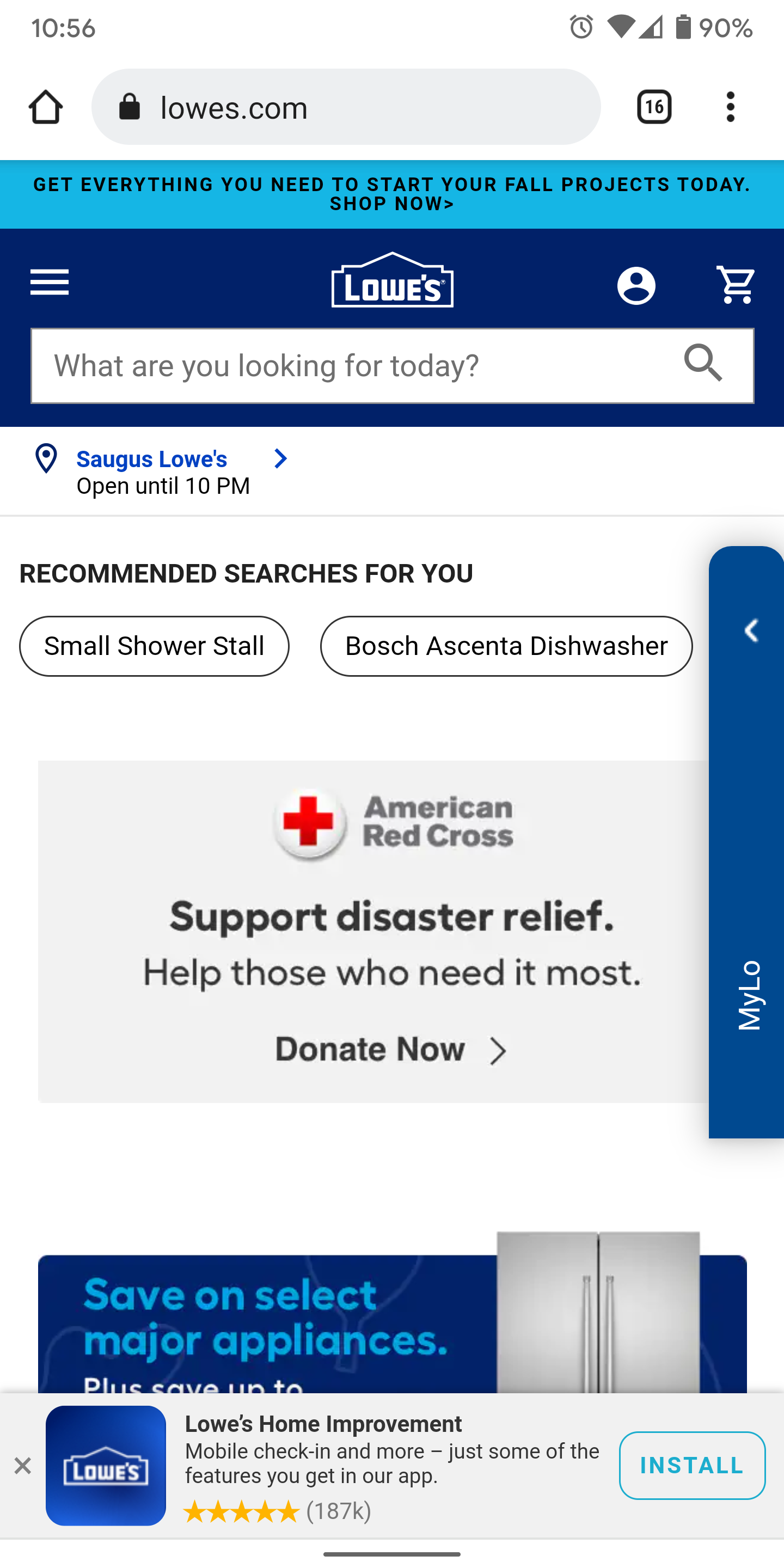
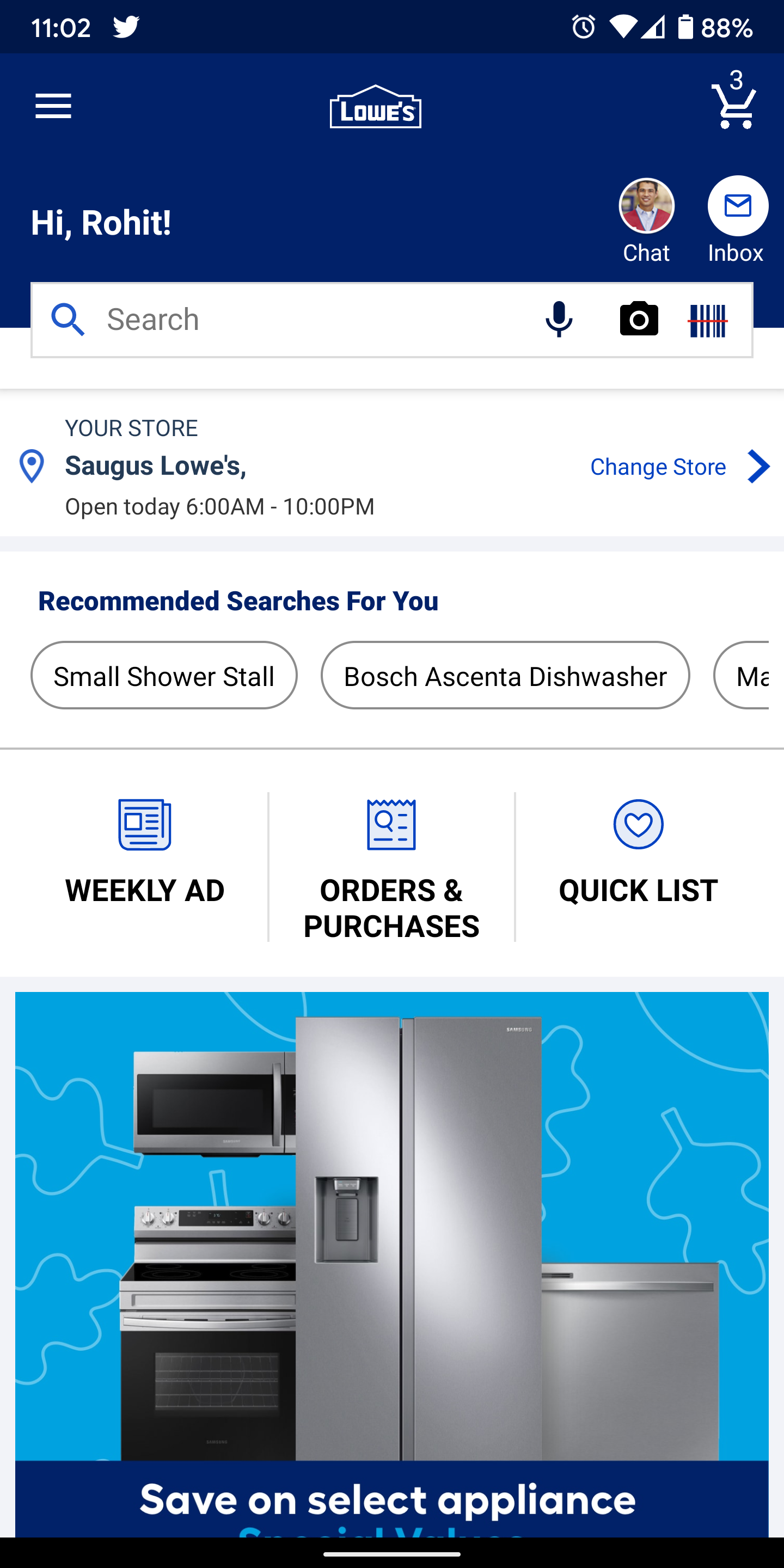
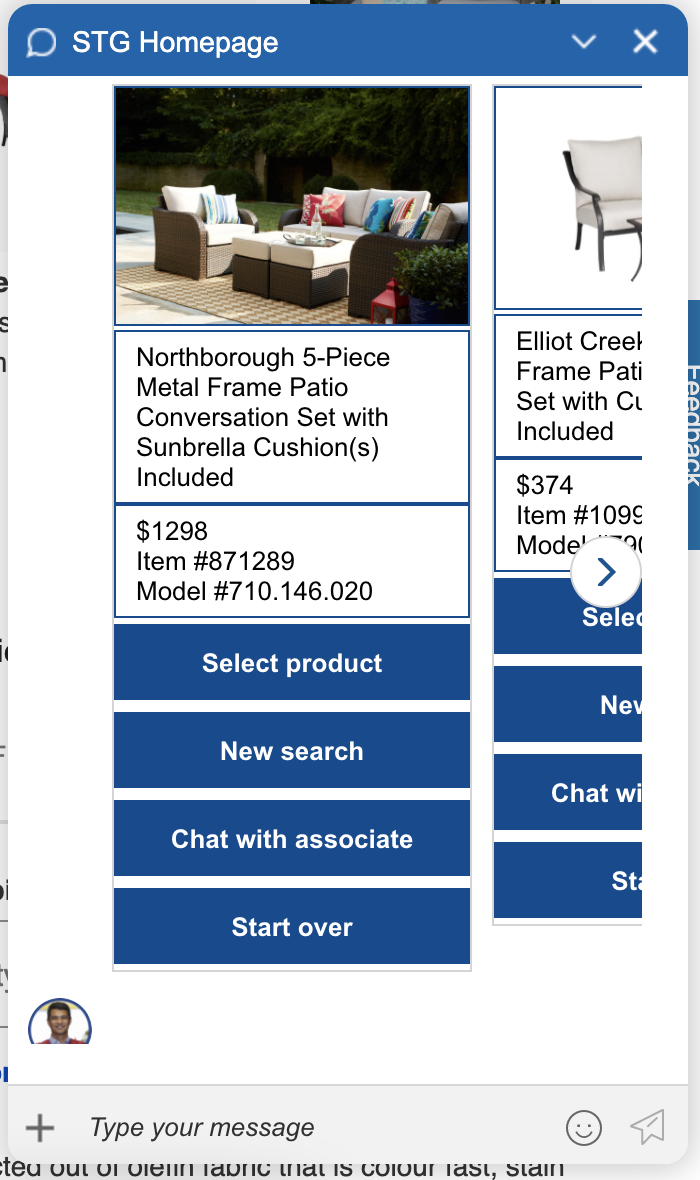
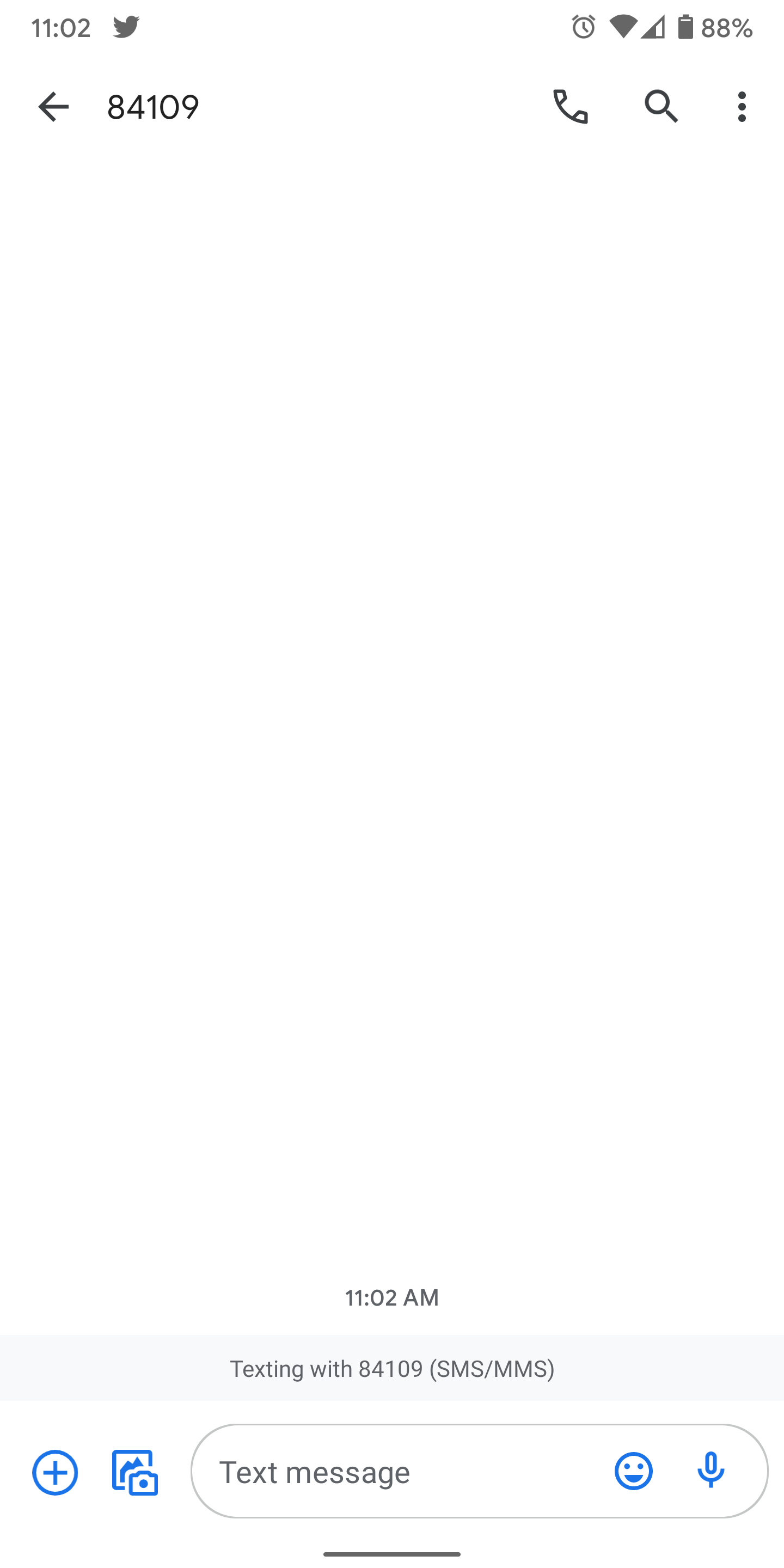
Chat screens across mobile web and Mobile App (SMS based chat interface)
Team
Product Manager, Senior UX Designer, UX Researcher, Content Writer, 2 Developers
I led the UX design effort, collaborating closely with product, research, content, and engineering to define interaction patterns, UI components, and design guidelines for the new chat system.
Tools used
Figma, UserTesting.com
Heuristic Review and UI Audit
The project began with a heuristic evaluation of the existing LivePerson-powered chat experience to identify usability issues, inconsistencies, and gaps across platforms.
In parallel, I conducted a UI component audit to document:
This helped clarify which issues were experience-related versus platform-driven constraints.
Process
Aligning with the Backyard Design System
Rather than creating a standalone chat UI, the goal was to extend Lowe’s Backyard design system to support conversational experiences.
Steps included:
Based on this analysis, I designed new chat-specific components that adhered to Backyard’s visual, accessibility, and interaction guidelines—ensuring consistency across
Lowe’s digital ecosystem.
Competitive & Industry Analysis
To ground decisions in best practices, I reviewed:
This helped inform decisions around:
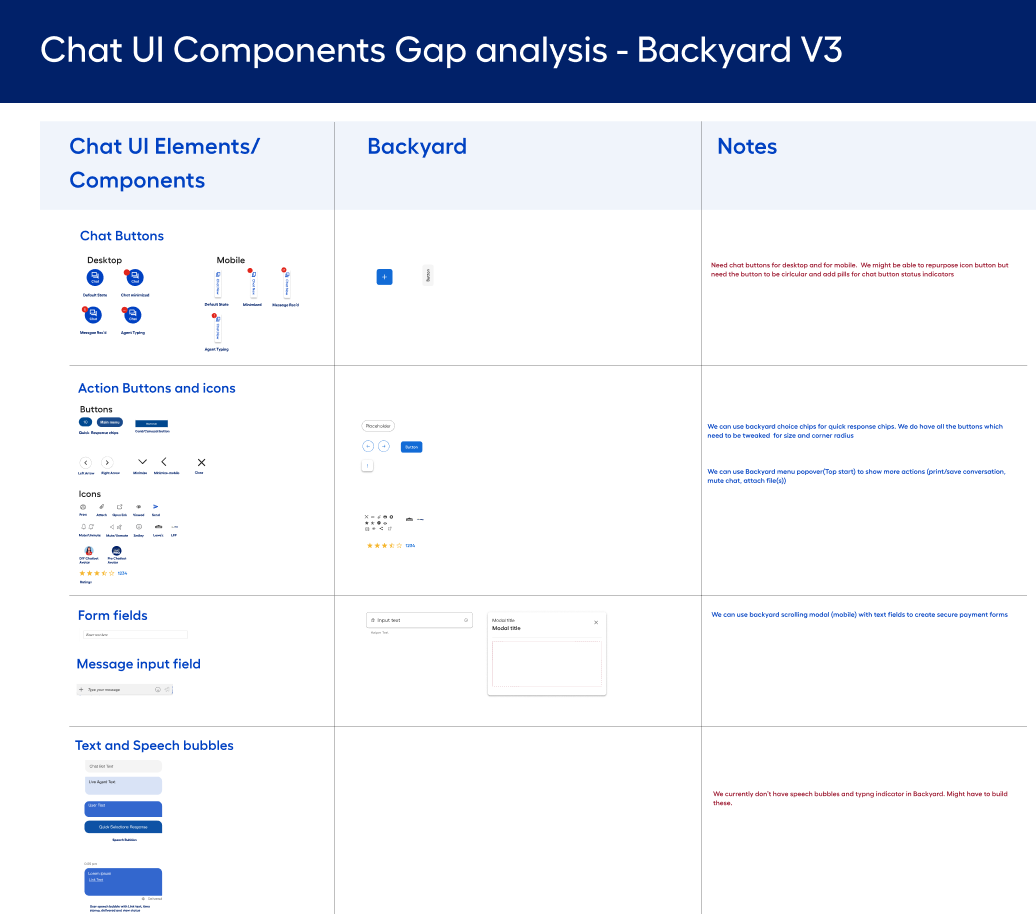
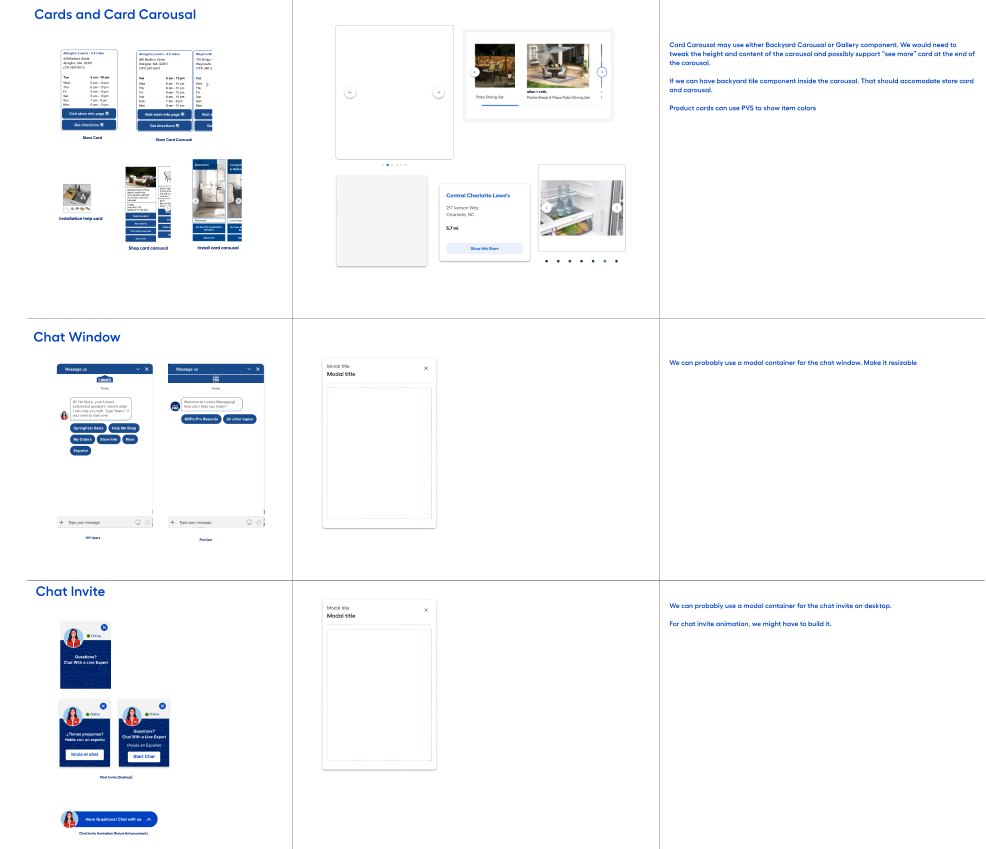
Gap analysis for chat components for mobile with Lowe’s Backyard design system
Early Design Concepts and Wireframes
The outcome was a modular Chat UI design system that supports:
Rather than focusing on individual screens, the system was designed around conversation states, message types, and interaction patterns—allowing flexibility without sacrificing consistency.
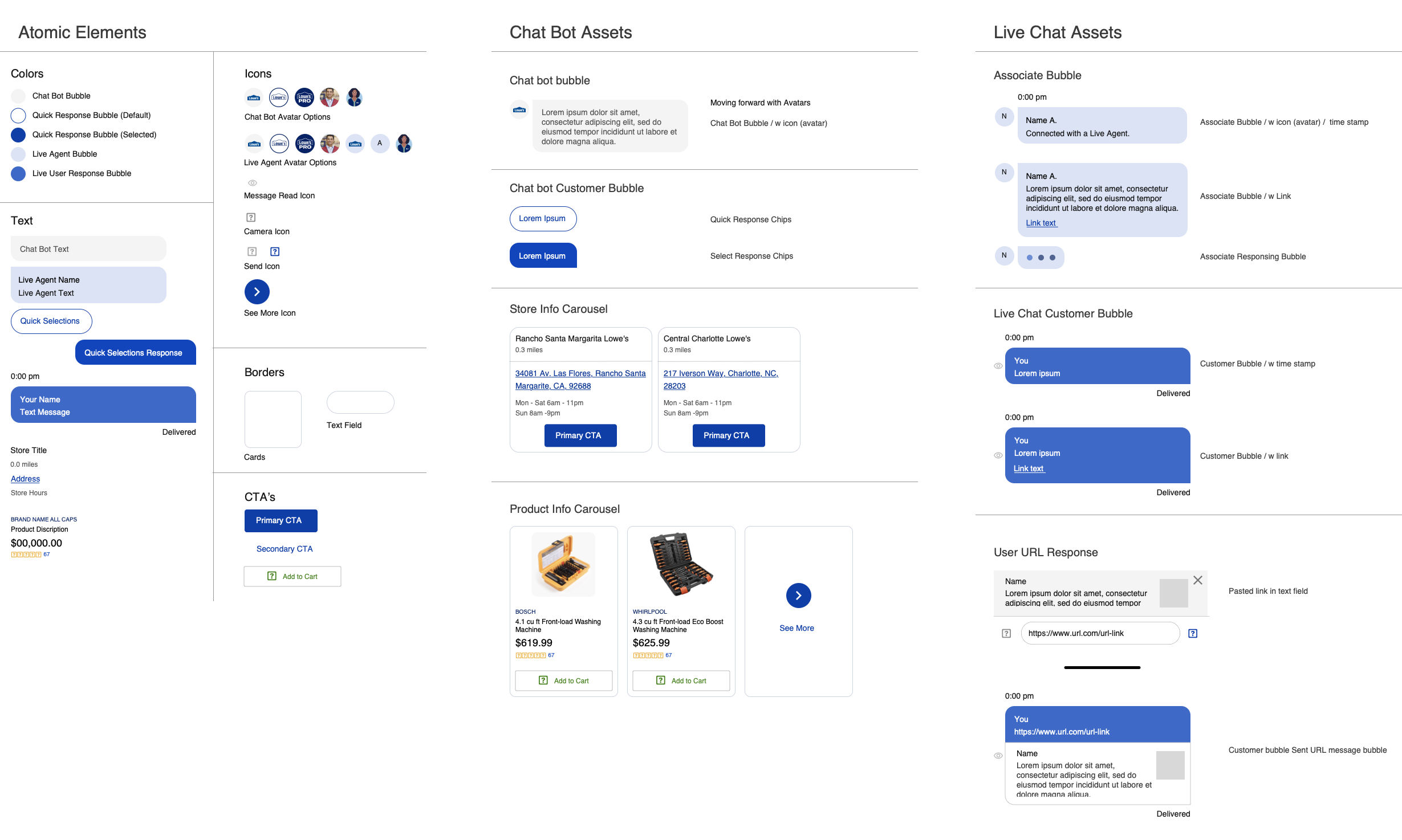
Early Concepts and Wireframes
User Testing and Iteration
Usability testing covered the full chat journey
Feedback from users directly informed refinements to
Designs were iterated in Figma and finalized through close collaboration with Product and Engineering to ensure feasibility and alignment with the MVP scope.
Hurdles & Technical Constraints
Several challenges influenced design decisions:
These constraints reinforced the importance of designing a system that could gracefully evolve over time.
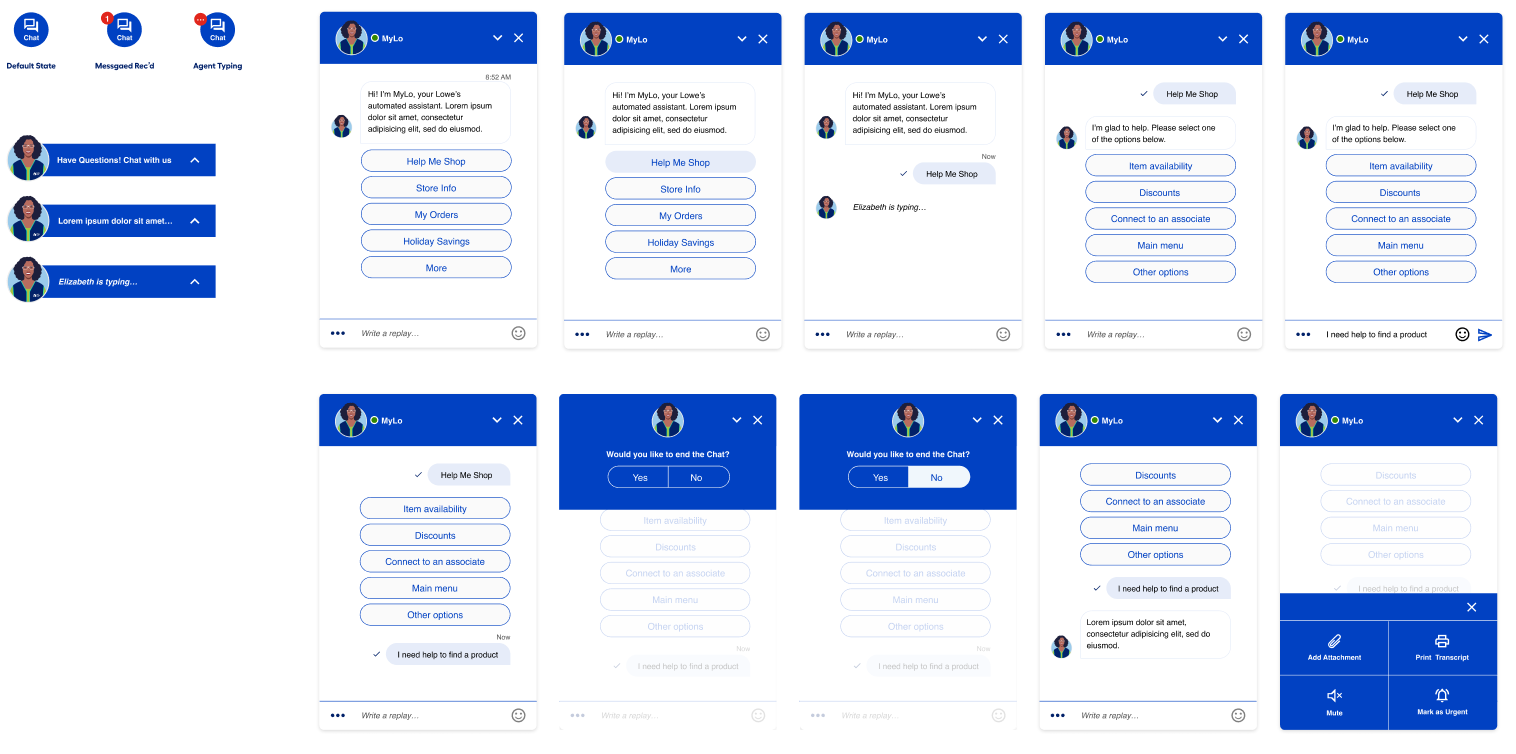
Chat entry and exit flows tested
Outcome and Key Learnings
Outcome
Most importantly, the chat experience shifted from a fragmented support tool to a cohesive, scalable conversational system owned and evolved by Lowe’s.
Key Learnings
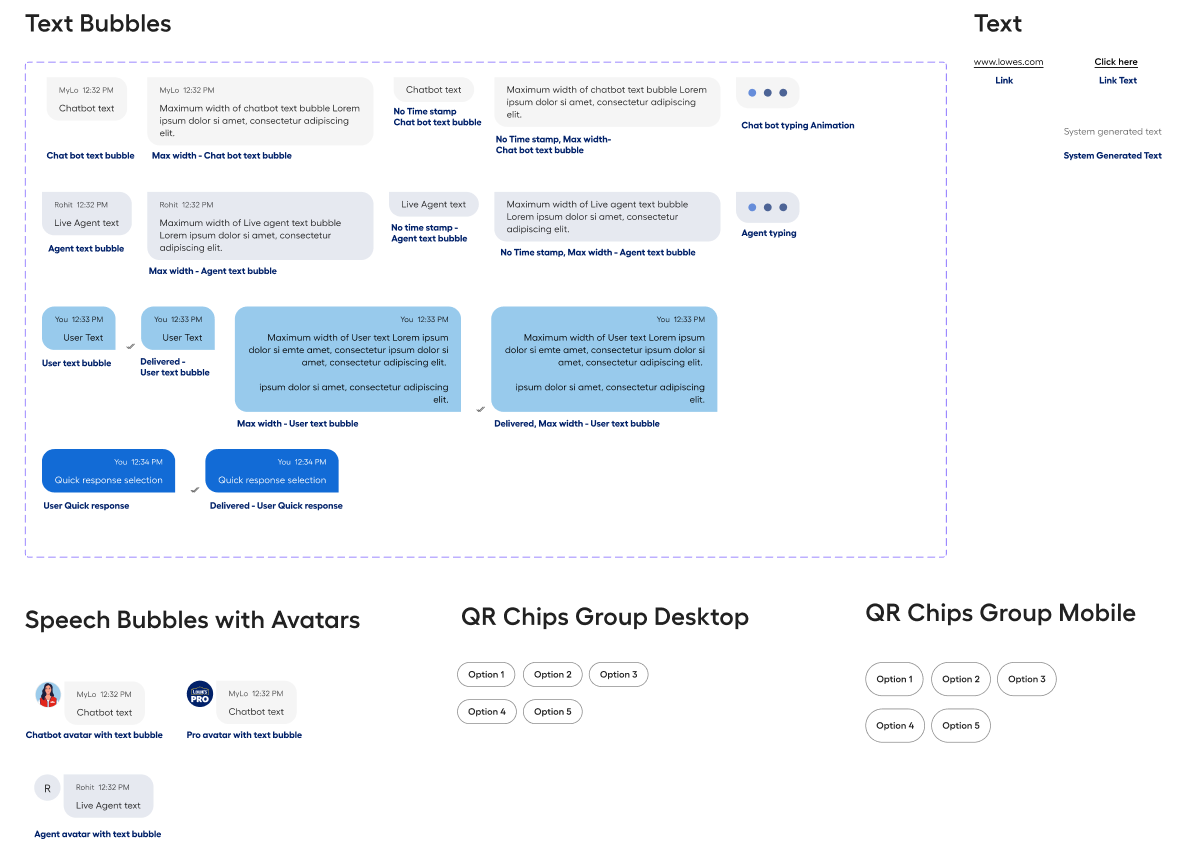
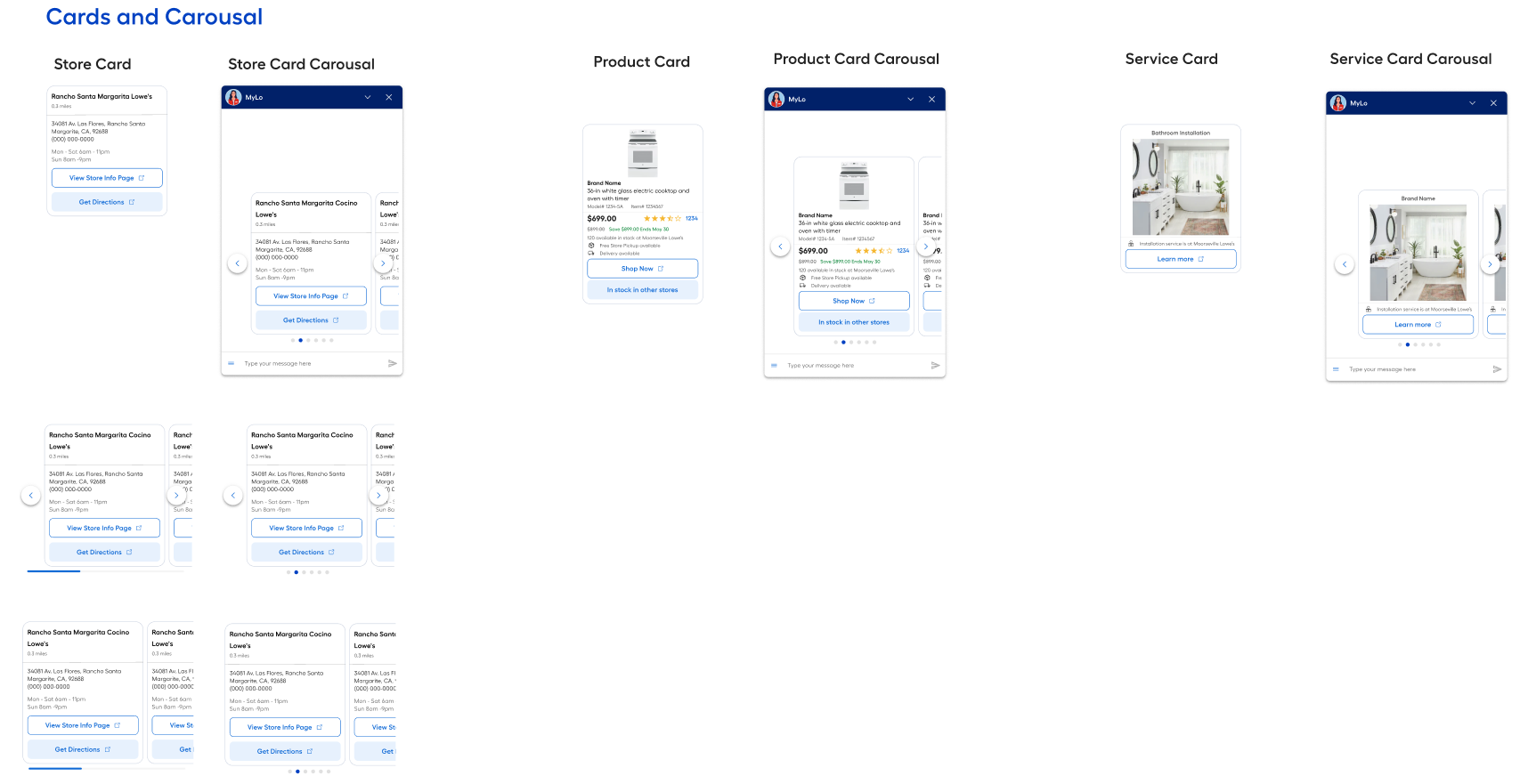
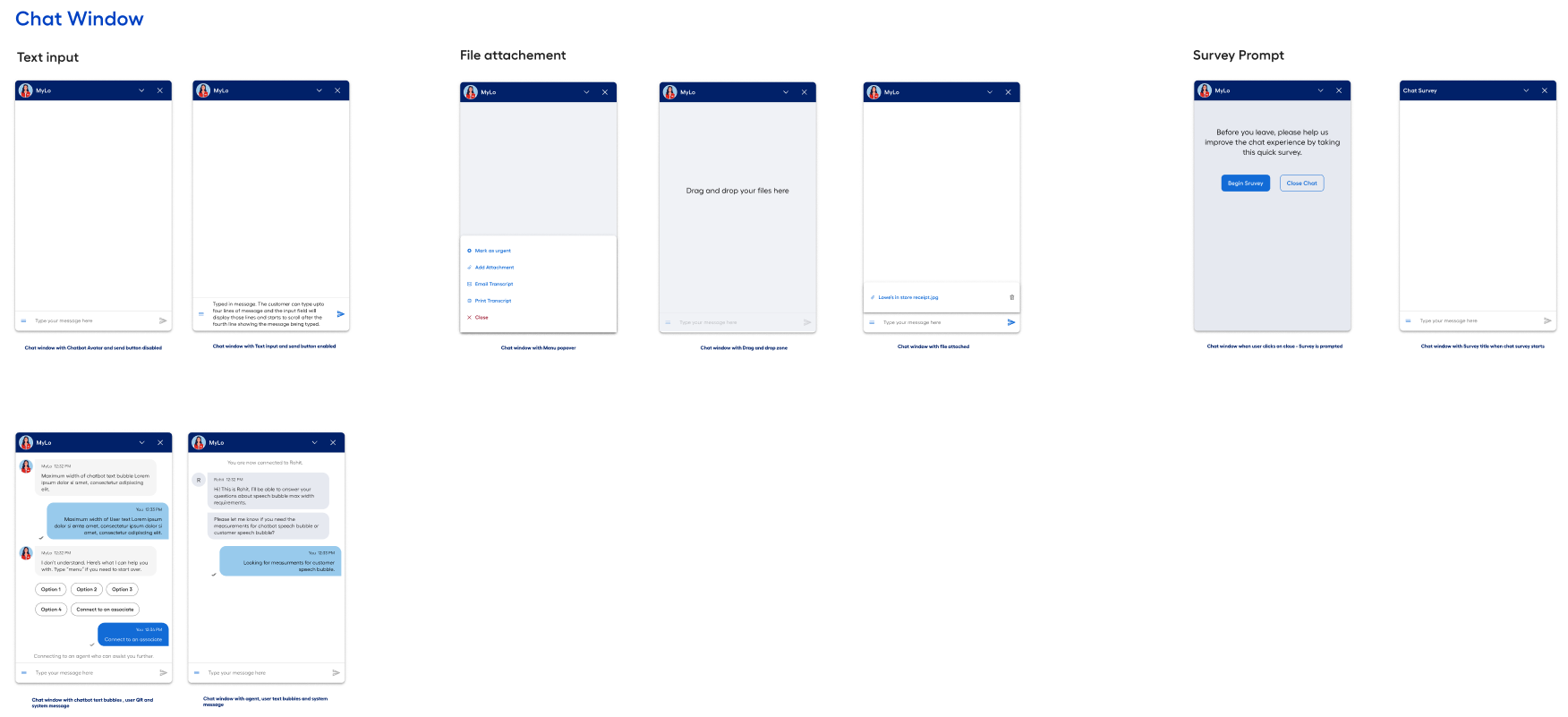
Finalized Lowe’s Chat Design System
Questions?
Reach out to me if you have any questions or want to learn more about the process, learnings and hurdles along the way.
Contact me
More Case Studies
Cards are a great way to organize content in a collection—products, case studies, services, and more.

Cards are a great way to organize content in a collection—products, case studies, services, and more.
Lowe’s In-House Chat UI Design System
Designing an in-house chat system that brings consistency, scalability, and human-centered UX to conversational support at Lowe’s.
Company
Lowe’s
Role
Senior UX Designer
Duration
6 months
About Lowe’s Chat Project
Lowe’s Chat experience was previously powered by a third-party vendor, LivePerson, to support both live agent chat and chatbot interactions. While functionally reliable, the platform imposed significant limitations on the front-end experience, resulting in inconsistent UI patterns, limited customization, and fragmented experiences across platforms.
This project focused on designing an in-house Chat UI framework and design system that would enable Lowe’s to deliver a consistent, scalable, and brand-aligned conversational experience across desktop web, mobile web, and native mobile apps—while supporting live agents, chatbot interactions, and future product-driven use cases.
Problem
The existing chat experience suffered from several core issues:
Inconsistent experiences across platforms
Vendor-driven UI constraints
Lack of system ownership
To address these issues, the Chat team proposed building an internally managed chat platform supported by a dedicated Chat UI design system that could scale across channels and interaction types.
Chat screens across mobile web and Mobile App (SMS based chat interface)
Team
Product Manager, Senior UX Designer, UX Researcher, Content Writer, 2 Developers
I led the UX design effort, collaborating closely with product, research, content, and engineering to define interaction patterns, UI components, and design guidelines for the new chat system.
Tools used
Figma, UserTesting.com
Heuristic Review and UI Audit
The project began with a heuristic evaluation of the existing LivePerson-powered chat experience to identify usability issues, inconsistencies, and gaps across platforms.
In parallel, I conducted a UI component audit to document:
This helped clarify which issues were experience-related versus platform-driven constraints.
Process
Aligning with the Backyard Design System
Rather than creating a standalone chat UI, the goal was to extend Lowe’s Backyard design system to support conversational experiences.
Steps included:
Based on this analysis, I designed new chat-specific components that adhered to Backyard’s visual, accessibility, and interaction guidelines—ensuring consistency across
Lowe’s digital ecosystem.
Competitive & Industry Analysis
To ground decisions in best practices, I reviewed:
This helped inform decisions around:
Gap analysis for chat components for mobile with Lowe’s Backyard design system
Early Design Concepts and Wireframes
The outcome was a modular Chat UI design system that supports:
Rather than focusing on individual screens, the system was designed around conversation states, message types, and interaction patterns—allowing flexibility without sacrificing consistency.
Early Concepts and Wireframes
User Testing and Iteration
Usability testing covered the full chat journey
Feedback from users directly informed refinements to
Designs were iterated in Figma and finalized through close collaboration with Product and Engineering to ensure feasibility and alignment with the MVP scope.
Hurdles & Technical Constraints
Several challenges influenced design decisions:
These constraints reinforced the importance of designing a system that could gracefully evolve over time.
Chat entry and exit flows tested
Outcome and Key Learnings
Outcome
Most importantly, the chat experience shifted from a fragmented support tool to a cohesive, scalable conversational system owned and evolved by Lowe’s.
Key Learnings
Finalized Lowe’s Chat Design System
Questions?
Reach out to me if you have any questions or want to learn more about the process, learnings and hurdles along the way.
Contact me
More Case Studies
Cards are a great way to organize content in a collection—products, case studies, services, and more.
Cards are a great way to organize content in a collection—products, case studies, services, and more.
Lowe’s In-House Chat UI Design System
Designing an in-house chat system that brings consistency, scalability, and human-centered UX to conversational support at Lowe’s.
Company
Lowe’s
Role
Senior UX Designer
Duration
6 months
About Lowe’s Chat Project
Lowe’s Chat experience was previously powered by a third-party vendor, LivePerson, to support both live agent chat and chatbot interactions. While functionally reliable, the platform imposed significant limitations on the front-end experience, resulting in inconsistent UI patterns, limited customization, and fragmented experiences across platforms.
This project focused on designing an in-house Chat UI framework and design system that would enable Lowe’s to deliver a consistent, scalable, and brand-aligned conversational experience across desktop web, mobile web, and native mobile apps—while supporting live agents, chatbot interactions, and future product-driven use cases.
Problem
The existing chat experience suffered from several core issues:
Inconsistent experiences across platforms
Vendor-driven UI constraints
Lack of system ownership
To address these issues, the Chat team proposed building an internally managed chat platform supported by a dedicated Chat UI design system that could scale across channels and interaction types.
Chat screens across mobile web and Mobile App (SMS based chat interface)
Team
Product Manager, Senior UX Designer, UX Researcher, Content Writer, 2 Developers
I led the UX design effort, collaborating closely with product, research, content, and engineering to define interaction patterns, UI components, and design guidelines for the new chat system.
Tools used
Figma, UserTesting.com
Heuristic Review and UI Audit
The project began with a heuristic evaluation of the existing LivePerson-powered chat experience to identify usability issues, inconsistencies, and gaps across platforms.
In parallel, I conducted a UI component audit to document:
This helped clarify which issues were experience-related versus platform-driven constraints.
Process
Aligning with the Backyard Design System
Rather than creating a standalone chat UI, the goal was to extend Lowe’s Backyard design system to support conversational experiences.
Steps included:
Based on this analysis, I designed new chat-specific components that adhered to Backyard’s visual, accessibility, and interaction guidelines—ensuring consistency across
Lowe’s digital ecosystem.
Competitive & Industry Analysis
To ground decisions in best practices, I reviewed:
This helped inform decisions around:
Gap analysis for chat components for mobile with Lowe’s Backyard design system
Early Design Concepts and Wireframes
The outcome was a modular Chat UI design system that supports:
Rather than focusing on individual screens, the system was designed around conversation states, message types, and interaction patterns—allowing flexibility without sacrificing consistency.
Early Concepts and Wireframes
User Testing and Iteration
Usability testing covered the full chat journey
Feedback from users directly informed refinements to
Designs were iterated in Figma and finalized through close collaboration with Product and Engineering to ensure feasibility and alignment with the MVP scope.
Hurdles & Technical Constraints
Several challenges influenced design decisions:
These constraints reinforced the importance of designing a system that could gracefully evolve over time.
Chat entry and exit flows tested
Outcome and Key Learnings
Outcome
Most importantly, the chat experience shifted from a fragmented support tool to a cohesive, scalable conversational system owned and evolved by Lowe’s.
Key Learnings
Finalized Lowe’s Chat Design System
Questions?
Reach out to me if you have any questions or want to learn more about the process, learnings and hurdles along the way.
Contact me
More Case Studies
Cards are a great way to organize content in a collection—products, case studies, services, and more.
Cards are a great way to organize content in a collection—products, case studies, services, and more.