Lowe’s In-House Chat UI Design System
Designing an in-house chat system that brings consistency, scalability, and human-centered UX to conversational support at Lowe’s.
Iron Mountain Global Portal
AI based data storage & managment
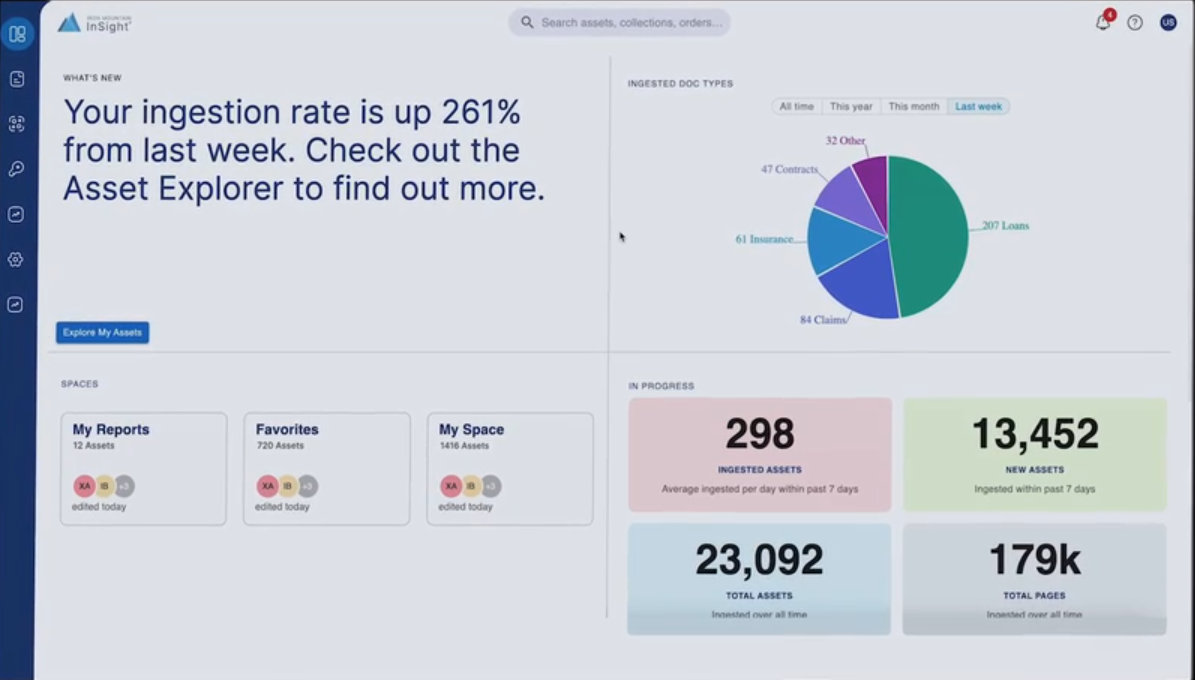
Designed AI-powered global portal for Iron Mountain, unifying data storage, search, and management across acquired services for seamless enterprise user experience.
Company
IronMountain
Role
UX Lead
Duration
6 months
About Iron Mountain
Iron Mountain provides information storage and management services to enterprises and SMBs across 50+ countries.
Problem
Iron Mountain has acquired the second largest competitor and it has it’s own set of services and customers across different markets. These are some of the high level problems observed and need to be tackled.
Team
UX Manager, UX Lead/Interaction Designer(Me), UX researcher, Visual Designer
Tools used
Figma, Sketch, Axure, and UserZoom for testing
My Contributions
UX Strategy, user research, wire framing, research and design demos, mentoring UX peers, collaboration with product marketing, branding, and web development
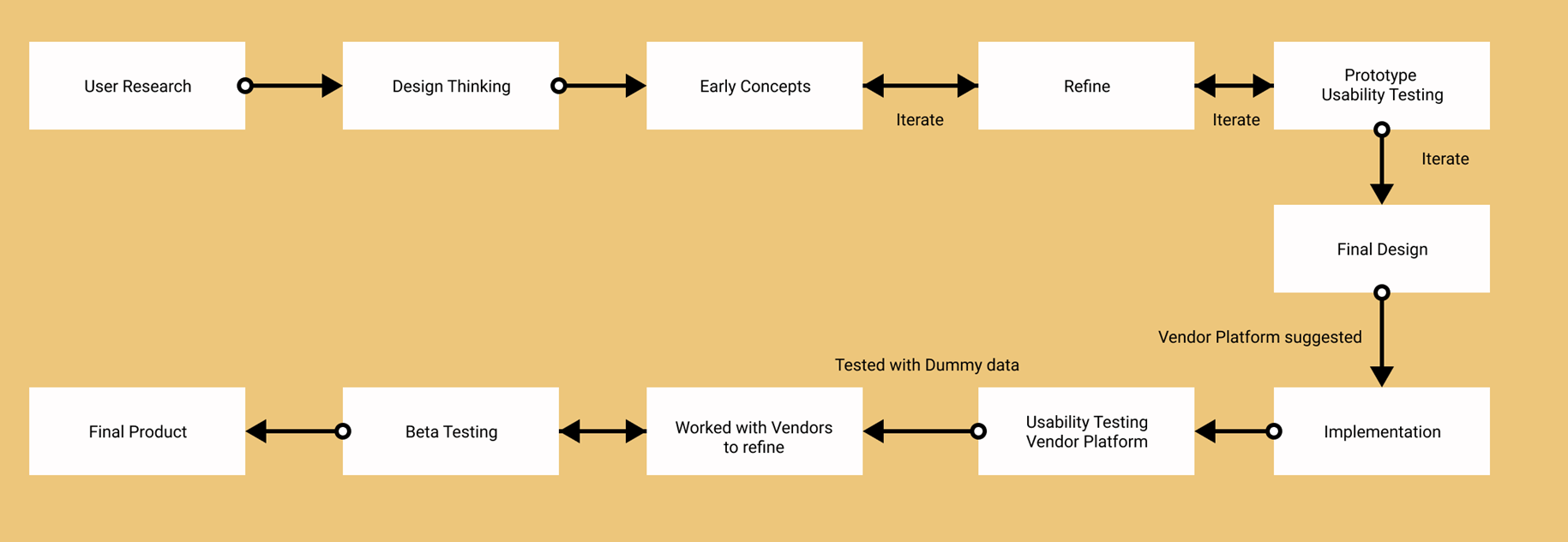
Design process Flow
User Research
Research team has conducted onsite and virtual user interviews with customers across USA and Brazil to understand the customer personas, work environment, pain points and current processes they use in their locations.
Users: 15 users across 5 different clients. Records managers, IT admins Department specific (HR, Legal) users of Iron Mountain related applications
Common Research Findings
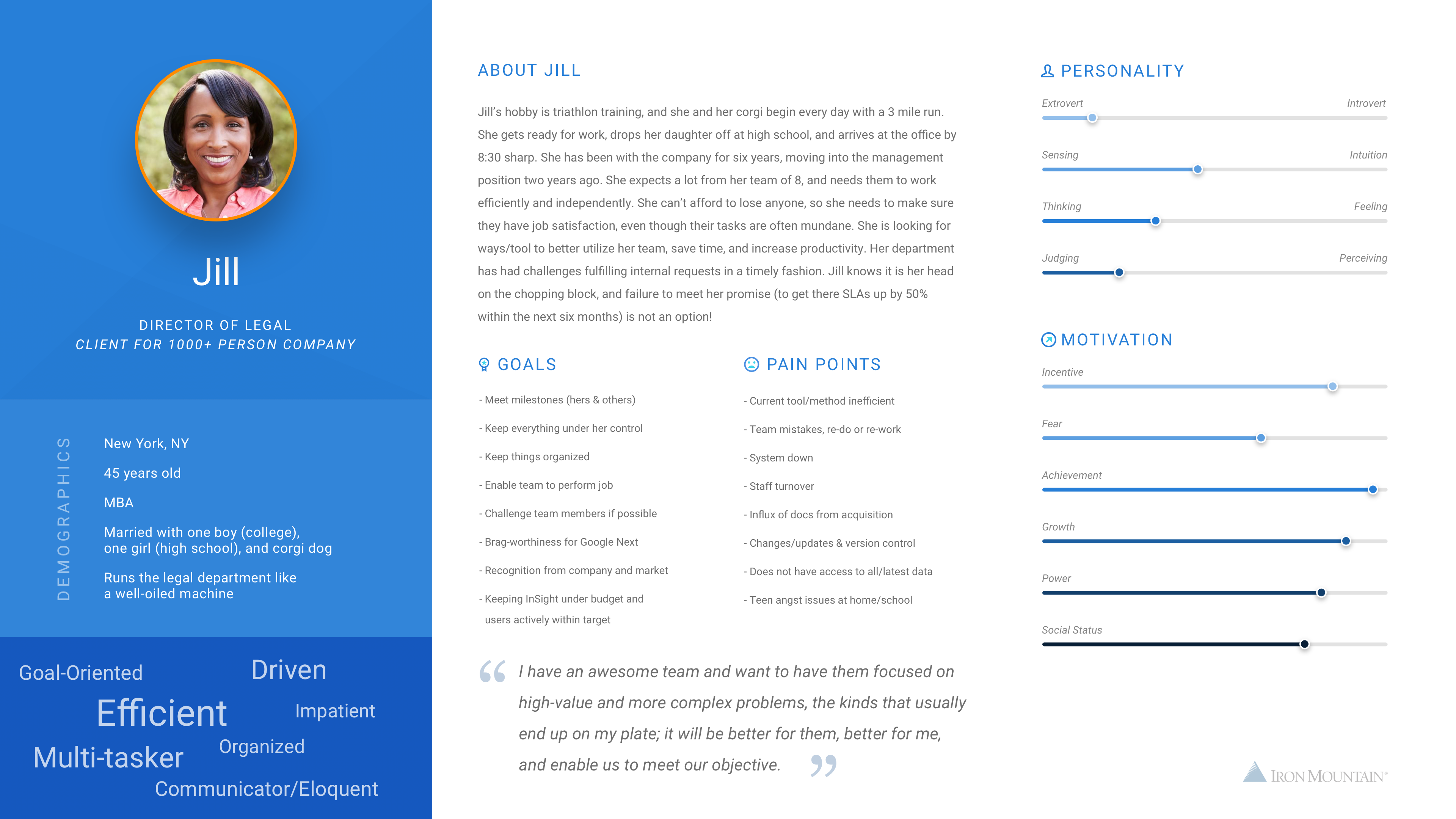
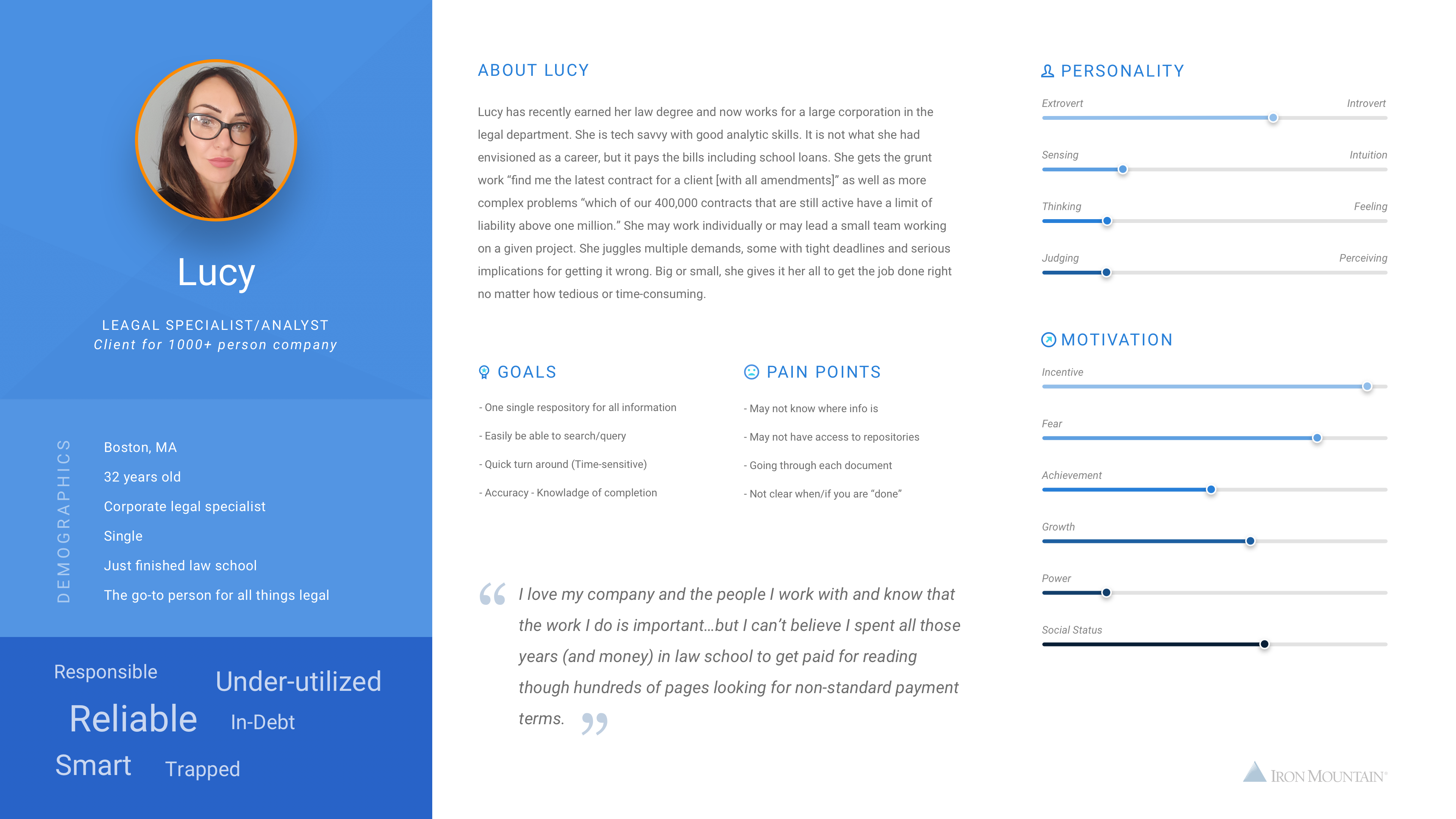
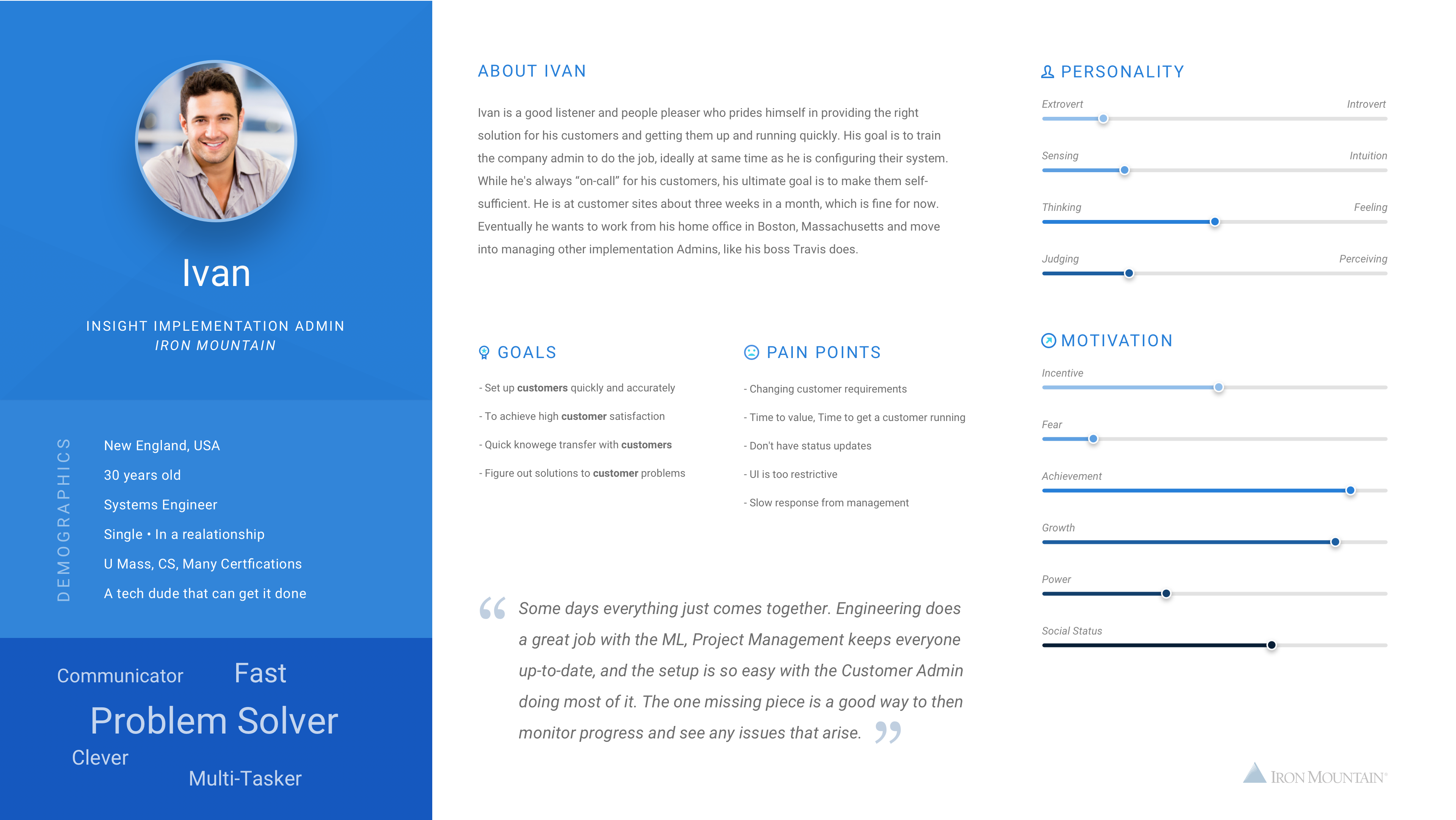
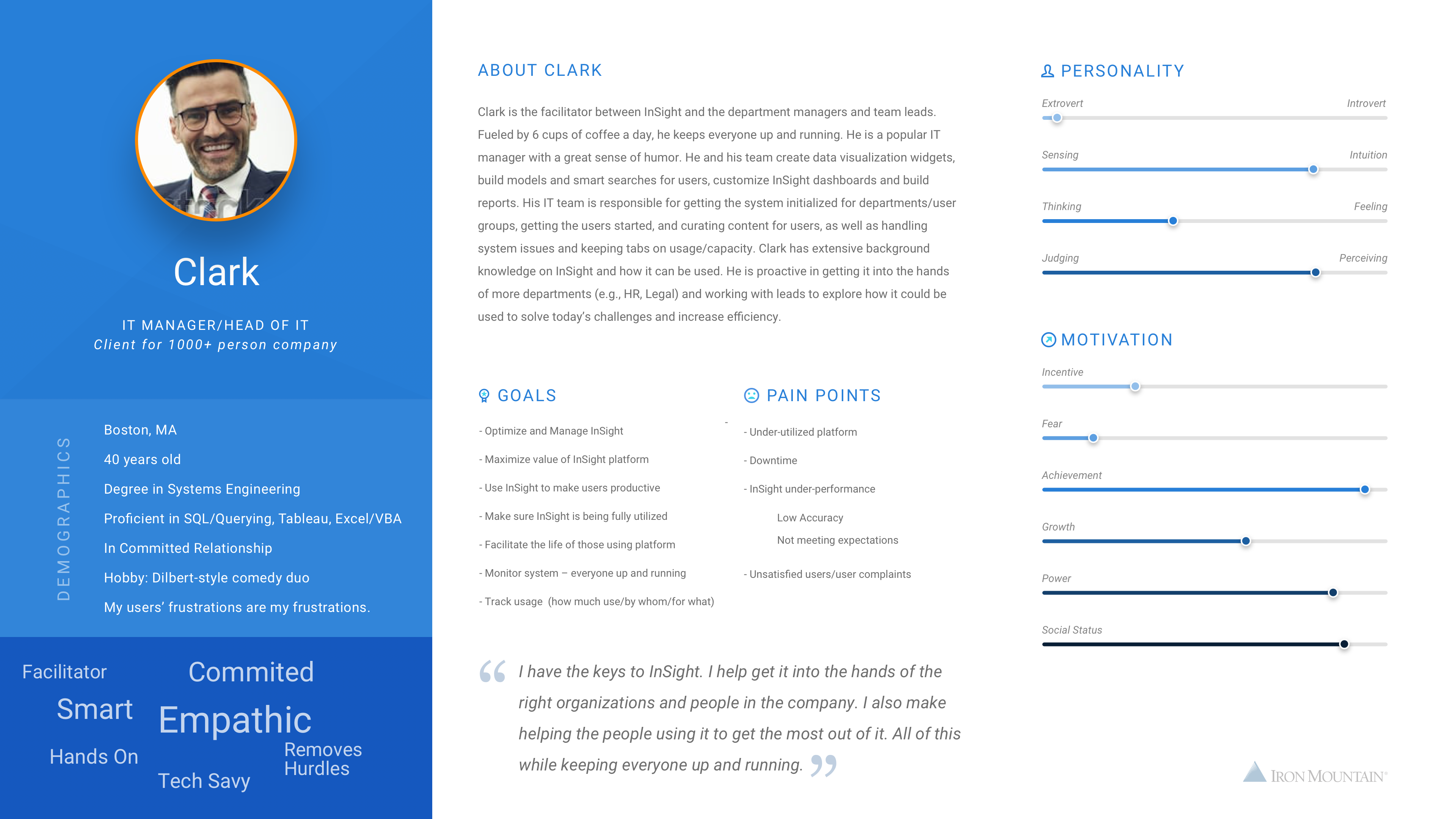
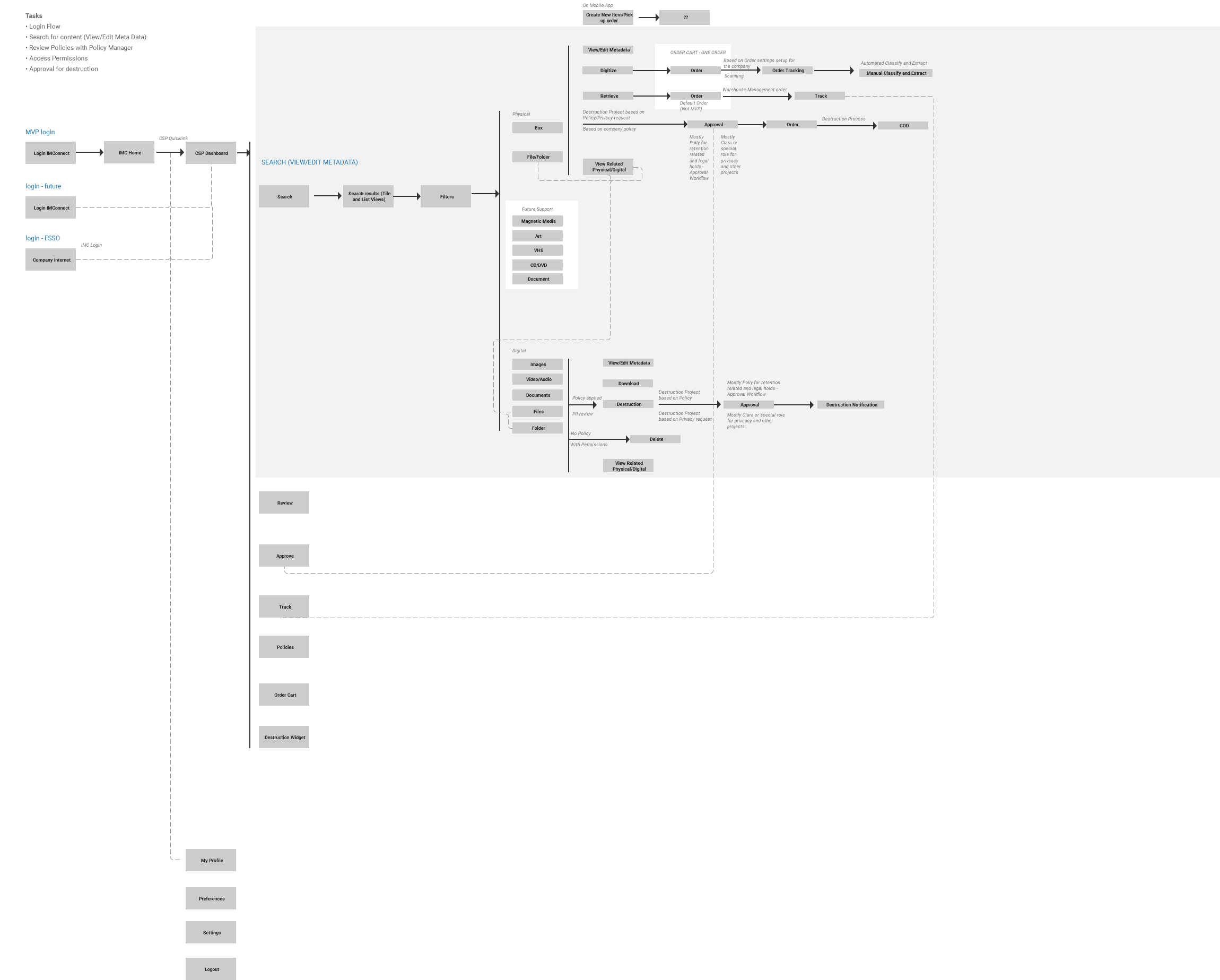
User personas and user journey flows
Design Thinking Session
Pain Points to high level requirements
Features
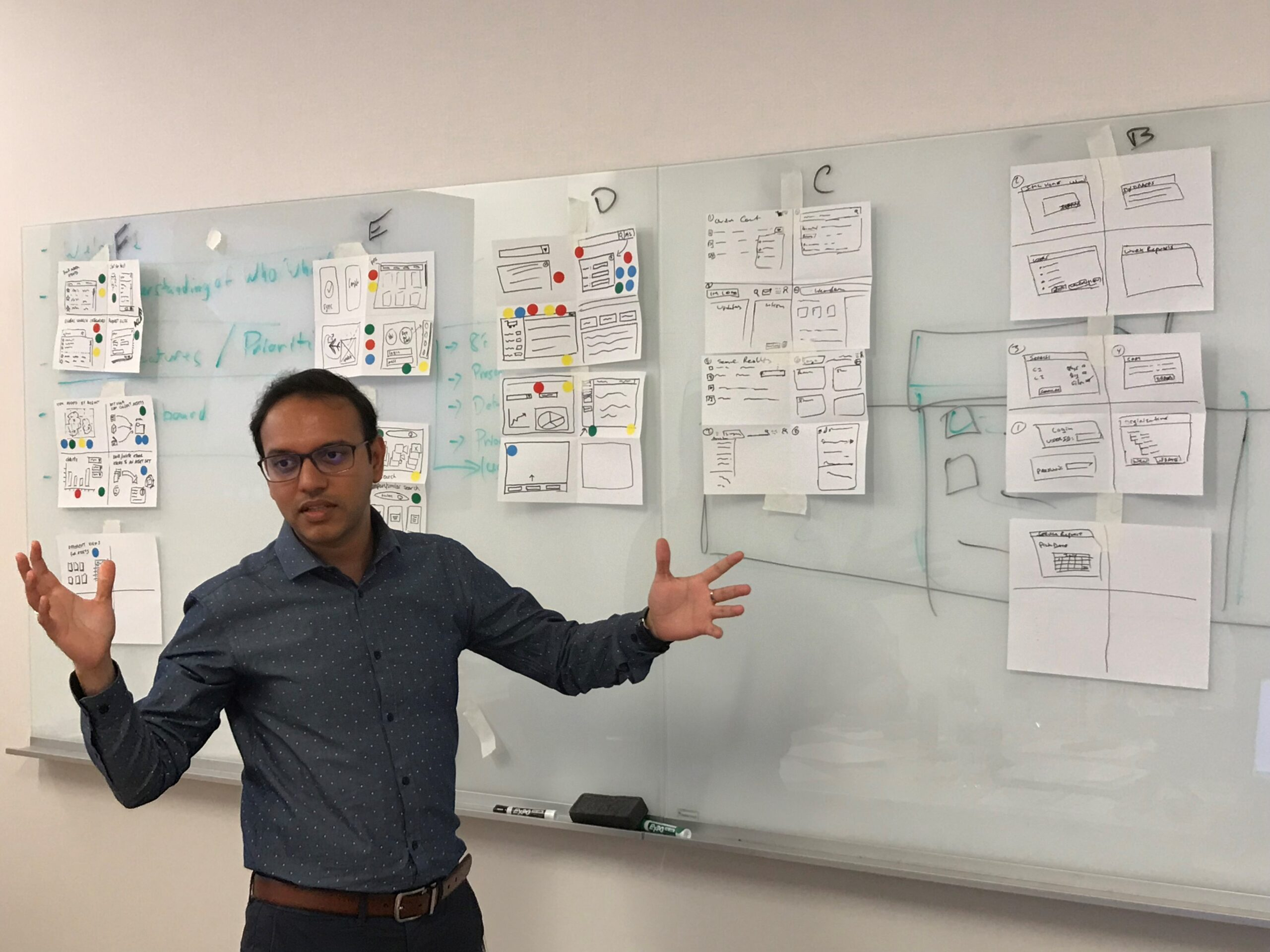
Design thinking session analyzing pain points and resulting features
Early Concepts and Wireframes
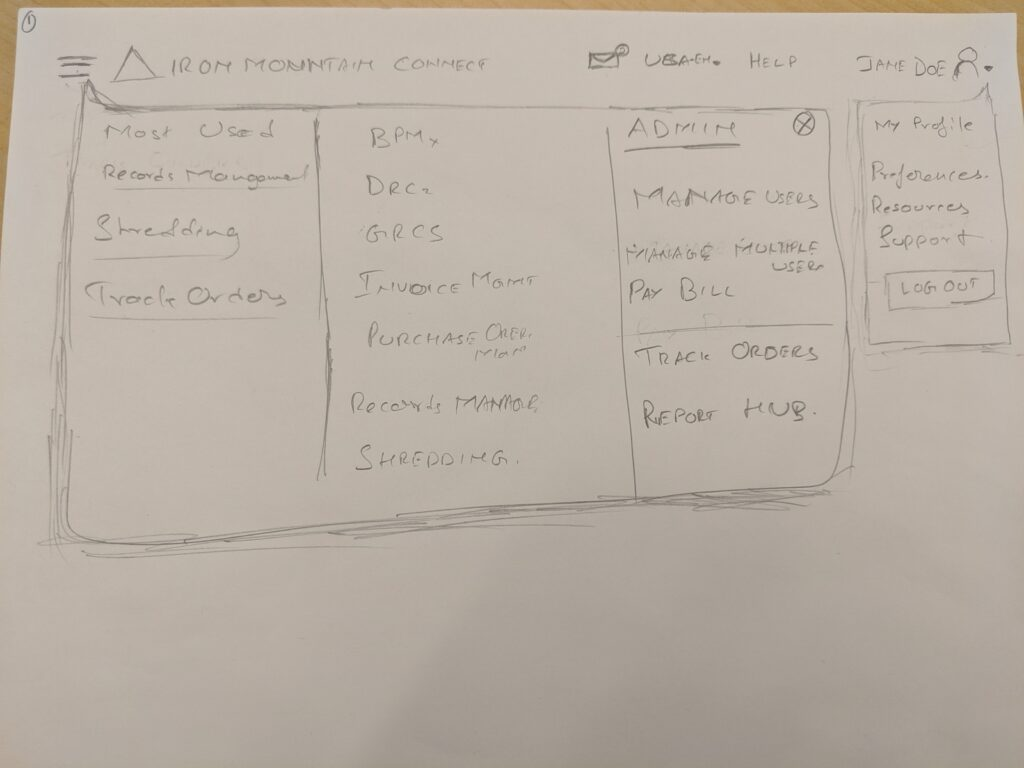
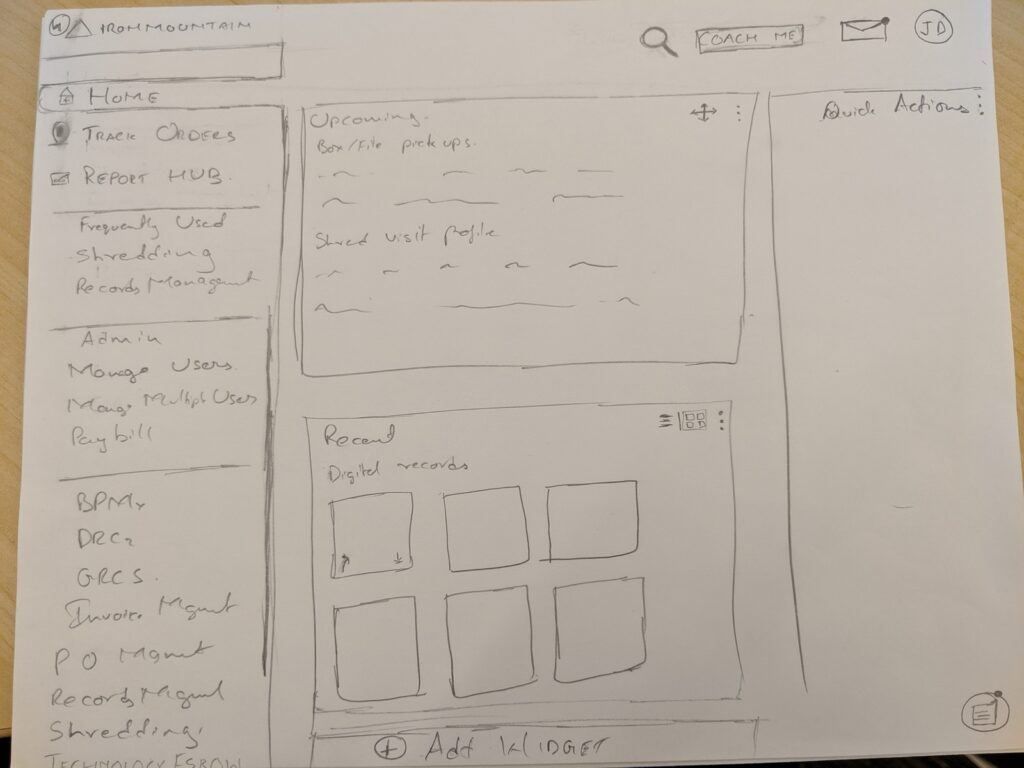
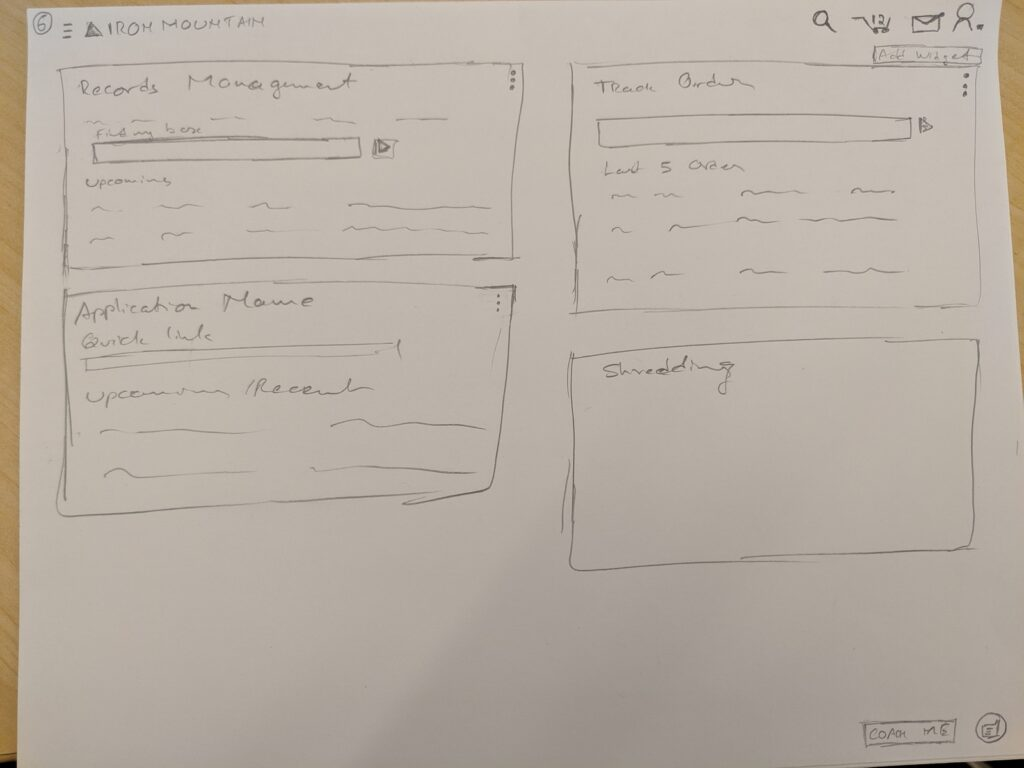
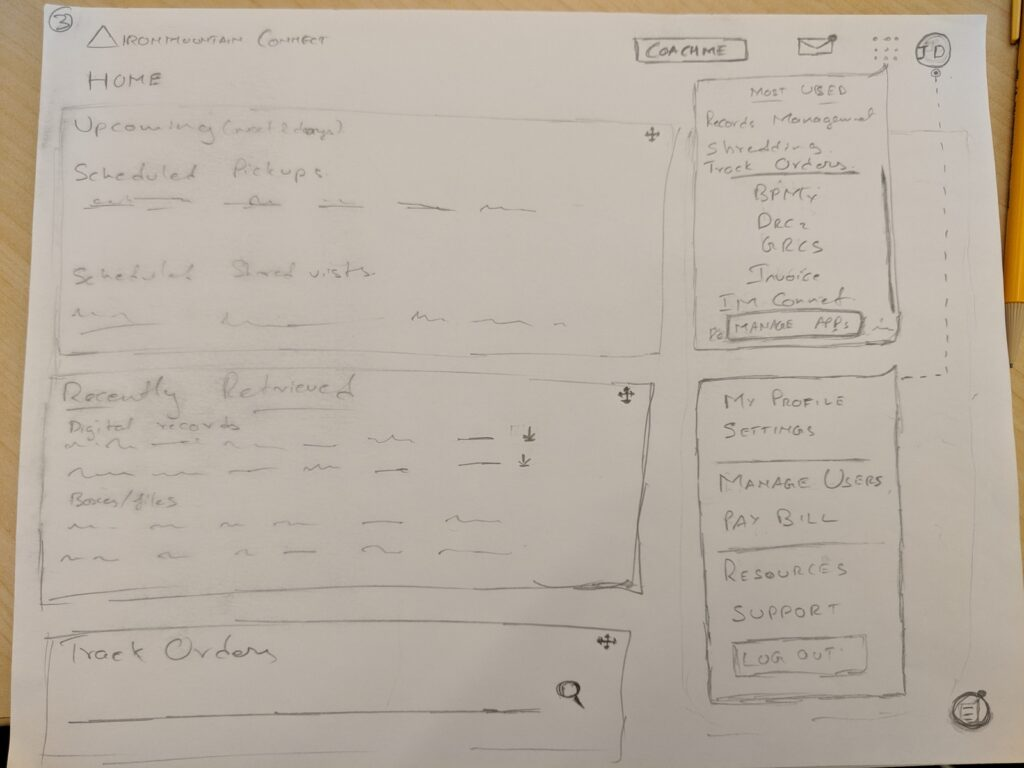
I tool the initial concepts and sketches and created wireframe variations. One of the primary ideas that came out of design thinking session is to make services as actions instead of going to different applications. This would make the system more scalable and help reduce multiple logins and provide a single platform for all user needs.
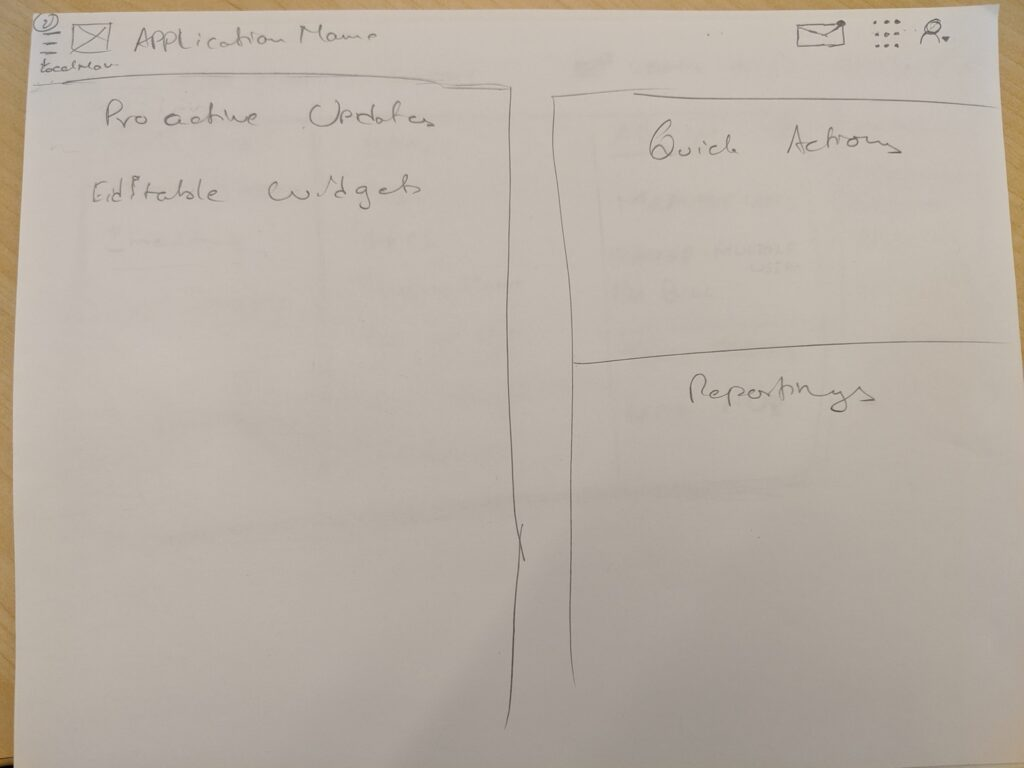
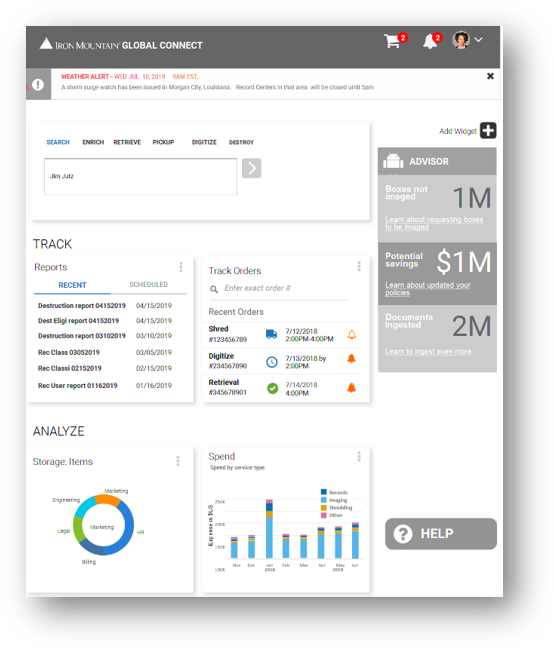
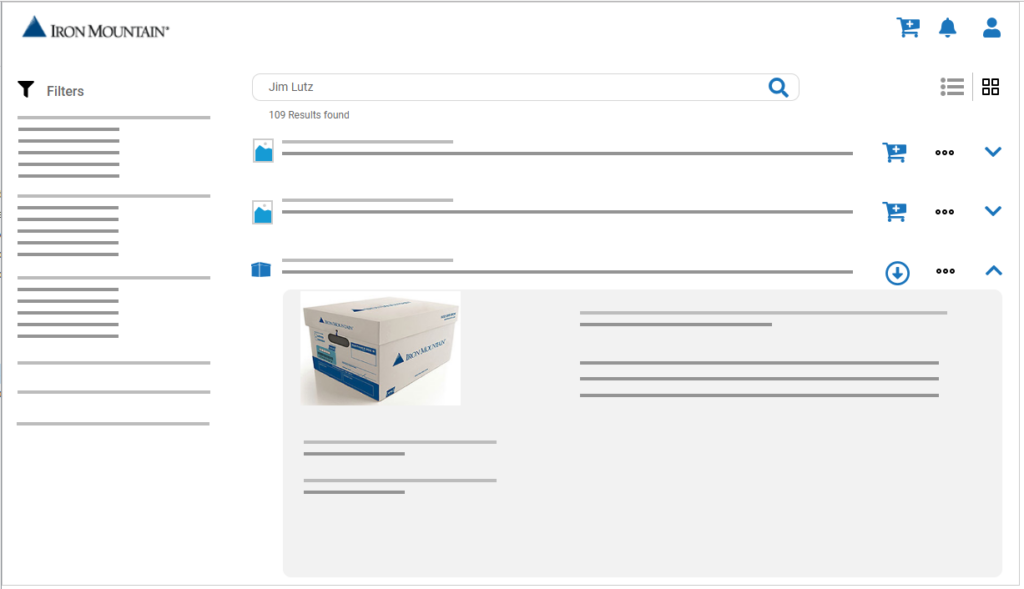
We took the dashboard designs from an existing product that was recently built. I focused my work more on the search and filters part of the design. I iterated on the wireframes through design reviews with UX peers and product management.
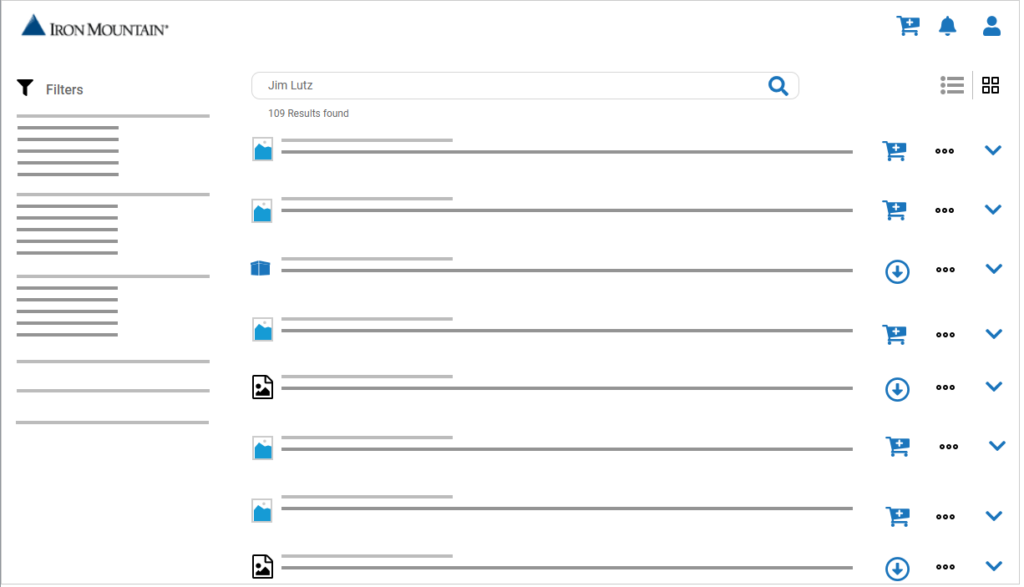
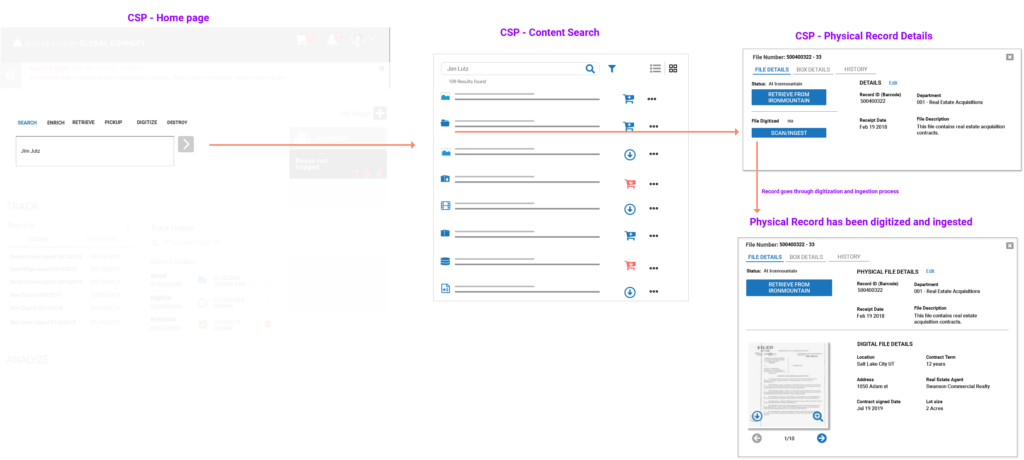
Early concepts and wireframes
Problems
Some of the main problem areas around search and filters are about presenting both physical and digital information from different backend systems. Each of those assets might be of different formats and have different metadata associated. We have to show that information clearly and easily while presenting any relation between those assets.
Filters are complex since we are dealing with enterprises which might have thousands of assets in various locations and custom metadata. Having multiple filters that needs to accommodate a vast set data types can make it overwhelming.
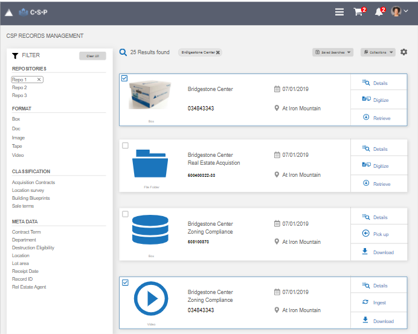
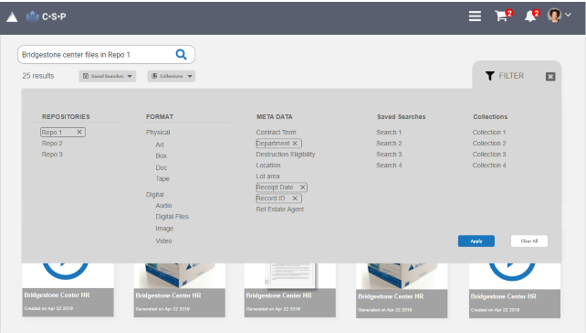
Iterations on presenting different data formats from multiple data sources and providing filtering capabilities based on AI generated meta data
User Testing and Final iteration
Tested the initial wireframes with internal users to get feedback on the filter variations and search results. Observed that filtering process is indeed overwhelming and that users don’t need the filters every time they use search especially if they save the search or search for specific set of documents (collections).
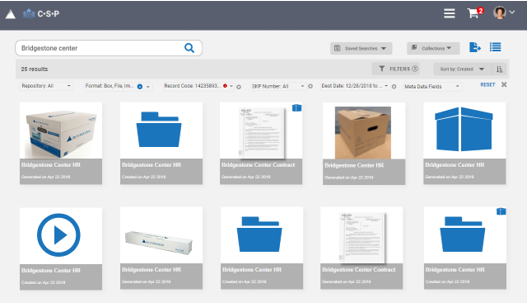
Updated designs on user feedback. Added options to save searches and create collections to support repetitive actions(right image)
Implementation
Senior executive team wanted to make use of an external vendor platform instead of inhouse development since it would require a lot development resources and time.
We worked with the vendor team to implement expert and novice user setting to reduce the complexity on the search results page, and changed the labels to reflect our customers. I worked with visual designers to fine tune the interface to make it consistent with the brand guidelines.
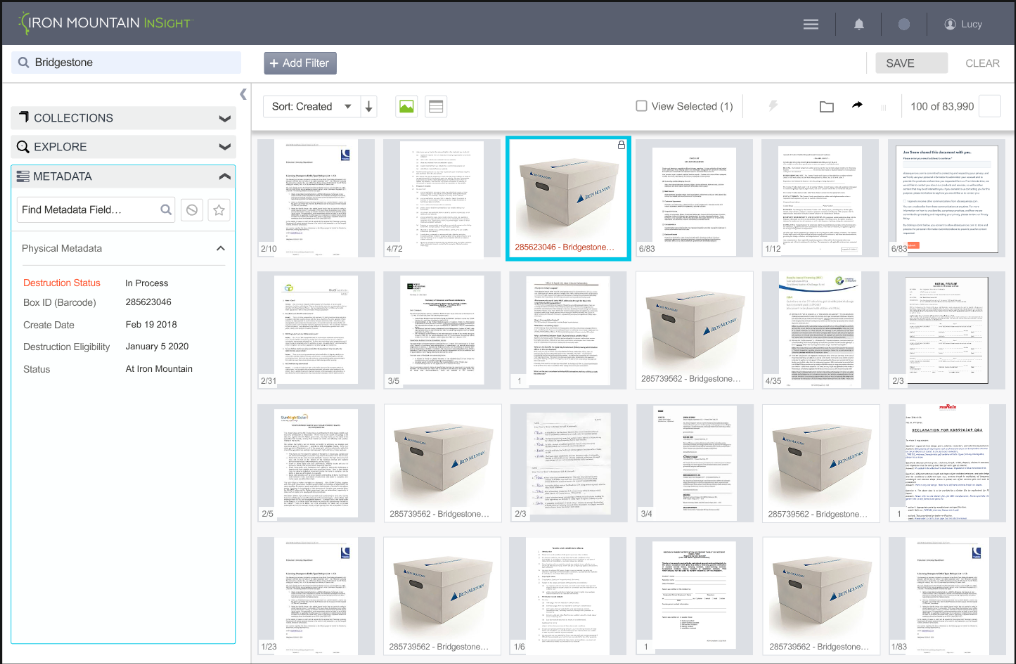
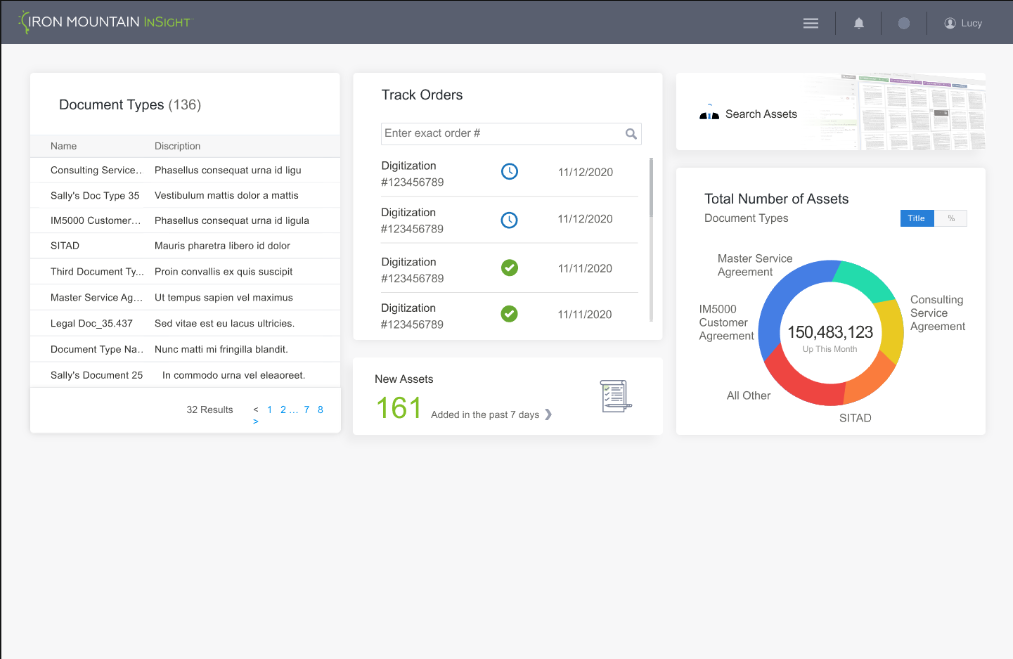
Implemented designs for MVP
Further improvements and next steps
Results & Impact
56%
Better decision making through analysis of unstructured content
52%
Improved contextual access to documents and metadata in business applications
48%
Improved efficiency through automated document workflows
Questions?
Reach out to me if you have any questions or want to learn more about the process, learnings and hurdles along the way.
Contact me
More Case Studies
Designing an in-house chat system that brings consistency, scalability, and human-centered UX to conversational support at Lowe’s.

Redesigned Iron Mountain website across 50+ countries and multiple languages to improve visibility into their vast array of services across information lifecycle management across different regions of the world.
Iron Mountain Global Portal
AI based data storage & managment
Designed AI-powered global portal for Iron Mountain, unifying data storage, search, and management across acquired services for seamless enterprise user experience.
Company
IronMountain
Role
UX Lead
Duration
6 months
About Iron Mountain
Iron Mountain provides information storage and management services to enterprises and SMBs across 50+ countries.
Problem
Iron Mountain has acquired the second largest competitor and it has it’s own set of services and customers across different markets. These are some of the high level problems observed and need to be tackled.
Team
UX Manager, UX Lead/Interaction Designer(Me), UX researcher, Visual Designer
Tools used
Figma, Sketch, Axure, and UserZoom for testing
My Contributions
UX Strategy, user research, wire framing, research and design demos, mentoring UX peers, collaboration with product marketing, branding, and web development
Design process Flow
User Research
Research team has conducted onsite and virtual user interviews with customers across USA and Brazil to understand the customer personas, work environment, pain points and current processes they use in their locations.
Users: 15 users across 5 different clients. Records managers, IT admins Department specific (HR, Legal) users of Iron Mountain related applications
Common Research Findings
User personas and user journey flows
Design Thinking Session
Pain Points to high level requirements
Features
Design thinking session analyzing pain points and resulting features
Early Concepts and Wireframes
I tool the initial concepts and sketches and created wireframe variations. One of the primary ideas that came out of design thinking session is to make services as actions instead of going to different applications. This would make the system more scalable and help reduce multiple logins and provide a single platform for all user needs.
We took the dashboard designs from an existing product that was recently built. I focused my work more on the search and filters part of the design. I iterated on the wireframes through design reviews with UX peers and product management.
Early concepts and wireframes
Problems
Some of the main problem areas around search and filters are about presenting both physical and digital information from different backend systems. Each of those assets might be of different formats and have different metadata associated. We have to show that information clearly and easily while presenting any relation between those assets.
Filters are complex since we are dealing with enterprises which might have thousands of assets in various locations and custom metadata. Having multiple filters that needs to accommodate a vast set data types can make it overwhelming.
Iterations on presenting different data formats from multiple data sources and providing filtering capabilities based on AI generated meta data
User Testing and Final iteration
Tested the initial wireframes with internal users to get feedback on the filter variations and search results. Observed that filtering process is indeed overwhelming and that users don’t need the filters every time they use search especially if they save the search or search for specific set of documents (collections).
Updated designs on user feedback. Added options to save searches and create collections to support repetitive actions(right image)
Implementation
Senior executive team wanted to make use of an external vendor platform instead of inhouse development since it would require a lot development resources and time.
We worked with the vendor team to implement expert and novice user setting to reduce the complexity on the search results page, and changed the labels to reflect our customers. I worked with visual designers to fine tune the interface to make it consistent with the brand guidelines.
Implemented designs for MVP
Further improvements and next steps
Results & Impact
56%
Better decision making through analysis of unstructured content
52%
Improved contextual access to documents and metadata in business applications
48%
Improved efficiency through automated document workflows
Questions?
Reach out to me if you have any questions or want to learn more about the process, learnings and hurdles along the way.
Contact me
More Case Studies
Designing an in-house chat system that brings consistency, scalability, and human-centered UX to conversational support at Lowe’s.
Redesigned Iron Mountain website across 50+ countries and multiple languages to improve visibility into their vast array of services across information lifecycle management across different regions of the world.
Iron Mountain Global Portal
AI based data storage & managment
Designed AI-powered global portal for Iron Mountain, unifying data storage, search, and management across acquired services for seamless enterprise user experience.
Company
IronMountain
Role
UX Lead
Duration
6 months
About Iron Mountain
Iron Mountain provides information storage and management services to enterprises and SMBs across 50+ countries.
Problem
Iron Mountain has acquired the second largest competitor and it has it’s own set of services and customers across different markets. These are some of the high level problems observed and need to be tackled.
Team
Product Manager, UX Manager, UX Lead/Interaction Designer, UX researcher, Visual Designer
My Contributions
Conducting design thinking sessions with product and stakeholders, design iterations, prototyping and usability testing.
Tools used
Figma, Sketch, Axure, and UserZoom for testing
Design process flow
User Research
Research team has conducted onsite and virtual user interviews with customers across USA and Brazil to understand the customer personas, work environment, pain points and current processes they use in their locations.
Users: 15 users across 5 different clients. Records managers, IT admins Department specific (HR, Legal) users of Iron Mountain related applications
Common Research Findings
User personas and user journey flows
Design Thinking Session
Pain Points to high level requirements
Features
Design thinking session analyzing pain points and resulting features
Early Concepts and Wireframes
I tool the initial concepts and sketches and created wireframe variations. One of the primary ideas that came out of design thinking session is to make services as actions instead of going to different applications. This would make the system more scalable and help reduce multiple logins and provide a single platform for all user needs.
We took the dashboard designs from an existing product that was recently built. I focused my work more on the search and filters part of the design. I iterated on the wireframes through design reviews with UX peers and product management.
Early concepts and wireframes
Problems
Some of the main problem areas around search and filters are about presenting both physical and digital information from different backend systems. Each of those assets might be of different formats and have different metadata associated. We have to show that information clearly and easily while presenting any relation between those assets.
Filters are complex since we are dealing with enterprises which might have thousands of assets in various locations and custom metadata. Having multiple filters that needs to accommodate a vast set data types can make it overwhelming.
Iterations on presenting different data formats from multiple data sources and providing filtering capabilities based on AI generated meta data
User Testing and Final iteration
Tested the initial wireframes with internal users to get feedback on the filter variations and search results. Observed that filtering process is indeed overwhelming and that users don’t need the filters every time they use search especially if they save the search or search for specific set of documents (collections).
Updated designs on user feedback. Added options to save searches and create collections to support repetitive actions(right image)
Implementation
Senior executive team wanted to make use of an external vendor platform instead of inhouse development since it would require a lot development resources and time.
We worked with the vendor team to implement expert and novice user setting to reduce the complexity on the search results page, and changed the labels to reflect our customers. I worked with visual designers to fine tune the interface to make it consistent with the brand guidelines.
Implemented designs for MVP
Further improvements and next steps
Results & Impact
56%
Better decision making through analysis of unstructured content
52%
Improved contextual access to documents and metadata in business applications
48%
Improved efficiency through automated document workflows
Questions?
Reach out to me if you have any questions or want to learn more about the process, learnings and hurdles along the way.
Contact me